Managing a diverse investment portfolio has outgrown the tools most people start with. If you hold rental property, private equity stakes, stock options, and a few brokerage accounts in different currencies, a single broker statement can't tell you your real return — and a spreadsheet struggles to keep up with the corporate actions, dividend reinvestments, and currency conversions behind it.
This is a comparison of four portfolio trackers built for that problem: Capitally, Kubera, Sharesight, and Snowball Analytics. Each takes a different position on the three things that matter most to a serious DIY investor — how it protects your financial data, how much of your wealth it can actually track, and how rigorously it measures performance. None of the four is the right answer for everyone, so this guide is organised to help you match the tool to your situation.
Table of Contents
- Which portfolio tracker should you choose?
- How the four trackers compare
- How should a portfolio tracker protect your financial data?
- Which trackers handle real estate, private equity, options and liabilities?
- What performance analytics do these tools actually compute?
- How do these trackers handle dividends and tax?
- How do you get your data in — and out?
- The four trackers in depth
- Capitally: best for privacy-conscious investors with complex portfolios
- Kubera: best for a simple, automated net-worth balance sheet
- Sharesight: best for automated dividend and tax reporting on listed securities
- Snowball Analytics: best for dashboard-driven strategy and goal tracking
- Common questions about portfolio trackers for DIY investors
- Conclusion
Which portfolio tracker should you choose?
The short answer: choose Capitally for privacy and analytical depth across complex, multi-currency portfolios; Kubera for the simplest automated net-worth balance sheet; Sharesight for automated dividend and tax reporting on listed securities; Snowball Analytics for a clean dashboard with rebalancing and goal tracking. Here is how each choice breaks down.
- Choose Capitally if you want on-device end-to-end encryption (no aggregator ever holds your broker credentials or touches your data) and need to track assets beyond stocks, including real estate, private equity, options, loans and other liabilities as first-class types, with professional-grade analytics: time-weighted return (TWR), money-weighted return (MWR/IRR), FX attribution, and specific-lot tax accounting across currencies and brokers.
- Choose Kubera if you want the simplest net-worth balance sheet, automatic balance sync from your banks and brokers, AI access that can feed your portfolio to ChatGPT, Claude, or Perplexity, and estate-handover features — and you don't need a transaction ledger, dividend analytics, or tax reports.
- Choose Sharesight if your portfolio is mostly listed stocks and ETFs and you file taxes in Australia, New Zealand, Canada, the UK, or the US, where its automated dividend tracking and country-specific tax reports do the most work for you.
- Choose Snowball Analytics if you want a clean, modern dashboard with target-allocation rebalancing, a dividend forecast, and goal tracking, and your holdings are mainstream — stocks, ETFs, and crypto — with no liabilities to track.
How the four trackers compare
The table below summarises where each tracker is strong and where it stops. In short: Capitally goes deepest on privacy, asset coverage, and analytics; Kubera is the lightest-touch net-worth tracker; Sharesight is the most automated for listed-security tax reporting; Snowball Analytics sits in between, with strategy tools but a narrower asset model.
Feature | Capitally | Kubera | Sharesight | Snowball Analytics |
|---|---|---|---|---|
Primary focus | Holistic wealth & performance analytics | Net-worth balance sheet | Listed-securities tax & dividend reporting | Dashboard & goal-based strategy |
Data privacy & encryption | On-device end-to-end encryption, no third-party trackers | Standard server-side, aggregator-based | Standard, SOC 2 Type 2, in-app ad trackers | Standard, in-app ad trackers |
Account connection | Manual statement / CSV import (no aggregator by design) | Auto-sync via 9 aggregators | Broker sync (around 240 brokers) + email import | Yodlee, SnapTrade + native IBKR |
Alternative & custom assets | Excellent (real estate, PE, options, collectibles as first-class types) | Limited (balance-based) | Limited (manual, second-tier) | Limited (custom assets lack class logic) |
Liabilities & net worth | First-class (loan/mortgage types, interest accrual, margin) | Balances only | ❌ None | ❌ None |
Performance analytics | TWR, MWR, IRR, ROI + Portfolio Explorer | Basic (net-worth trend, IRR) | Money-weighted, predefined reports | TWR, MWR, Sharpe; reports not saveable |
Multi-currency / FX attribution | Deep (separates capital vs currency return) | View-only, no FX attribution | Yes (separate capital & currency gains) | View-only, no FX attribution |
Dividend tracking | Automated DRIP, calendar, forecast, withholding tax | ❌ Not tracked (treated as cash flow) | Automated, incl. DRIP, calendar, forecast | Calendar, forecast, Dividend Rating; DRIP is manual/import-only |
Tax reporting | Built-in capital-gains presets for around 11 jurisdictions, 6 cost-basis methods, tax-loss harvesting | ❌ | Strong for AU, NZ, CA, UK, US | ❌ No cost-basis; withholding-tax logging only |
Options & derivatives | Yes (puts/calls, multi-leg strategies, Greeks) | ❌ Not supported | ❌ Not supported | ❌ Not supported |
AI / programmatic access | ❌ No MCP or API yet | MCP + API (ChatGPT, Claude, Perplexity, Gemini) | API only | ❌ Not supported |
Platforms | Web + installable PWA, works offline | Web + PWA | Web + native mobile (limited) | Web + native mobile (limited) |
Pricing | €80 / €130 / €250 per year, 14-day trial | $250/year (Black $2,500), no free plan | Free / $7 / $18 / $23.25 per month, 7-day trial | Free / $79.99 / $149.99 / $249.99 per year, 14-day trial |
How should a portfolio tracker protect your financial data?
The strongest privacy model is on-device end-to-end encryption: your data is encrypted with a key derived from your password that never leaves your device, so the company running the service cannot read your portfolio. Among these four, only Capitally works this way.
Kubera, Sharesight, and Snowball Analytics use standard server-side security — encryption in transit and at rest — which protects against outside attackers but leaves your data readable to the provider.
There is a second privacy dimension: how the tracker connects to your accounts, and what it loads in your browser. Capitally never uses a bank or brokerage aggregator — you upload broker statements yourself, so no third party holds your credentials.
Kubera, and Snowball both rely on aggregators such as Plaid, Yodlee, or SnapTrade for automatic sync, which means sharing broker logins and your financial data with that third party.
Sharesight handles brokerage statements you upload yourself, plus transaction confirmation emails you receive from brokers. There's no third-party involved.
As of May 2026, Kubera, Sharesight and Snowball Analytics also load third-party advertising analytics trackers inside the app itself — Meta, Reddit, Taboola, Bing and others — while Capitally limit them to the marketing pages only. For an investor who treats financial data as private by default, this is the clearest dividing line in the comparison.
Which trackers handle real estate, private equity, options and liabilities?
Capitally is the only one of the four that treats alternative assets and liabilities as first-class parts of the portfolio. It has dedicated asset types for real estate and rental income, private equity with the full capital-call and distribution lifecycle, stock options, loans, and mortgages — with automatic interest accrual and amortization — plus margin and short positions.
Kubera can hold almost any asset too, but only as a balance you update rather than a position with a transaction history. Sharesight and Snowball Analytics are built for listed securities; both let you add custom assets for things like property, but they behave as second-tier entries without class-specific logic, and neither tracks liabilities.
This matters for net worth. A tracker that can't model a mortgage or a margin loan will overstate what you are worth. Capitally shows Owned, Owed, and a Debt Ratio across the whole portfolio, with interest and amortization handled automatically; Kubera records liabilities as manual balances; Sharesight and Snowball leave them out of the model entirely.
What performance analytics do these tools actually compute?
The two return figures that matter are time-weighted return (TWR), which strips out the effect of when you added or withdrew money — useful for judging your strategy — and money-weighted return (MWR, also called IRR), which includes your timing. Capitally computes both, plus ROI and period returns, and adds FX attribution and six cost-basis methods for tax-lot analysis.
Sharesight reports money-weighted performance and, like Capitally, separates capital gains from currency gains. Snowball Analytics has TWR, MWR, and a Sharpe ratio, but no FX-versus-capital attribution. Kubera keeps it deliberately simple: a net-worth trend line with IRR, and no deeper analytics.
Two capabilities are worth singling out because they are rare in personal trackers. FX attribution — knowing whether a strong year came from the asset or just the exchange rate — is something only Capitally and Sharesight do here. And options analytics, including Greeks priced with Black-Scholes-Merton and Barone-Adesi-Whaley models and multi-leg strategy grouping, is something only Capitally offers; Kubera, Sharesight, and Snowball do not track options as a native asset type at all.
How do these trackers handle dividends and tax?
For dividends, Capitally and Sharesight are the most automated: both populate announced dividends, support dividend reinvestment (DRIP) automatically, and forecast future income. Snowball Analytics has a dividend calendar, a 12-month forecast, and its own Dividend Rating, but DRIP is not automated — reinvestment transactions have to be imported from your broker. Kubera does not track dividends as a category; they appear as undifferentiated cash flow.
For tax, the difference is breadth versus polish. Sharesight produces the most polished country-specific reports, but only for Australia, New Zealand, Canada, the UK, and the US. Capitally has built-in capital-gains tax presets for eleven jurisdictions, six selectable cost-basis methods — FIFO, LIFO, highest cost, lowest cost, average cost, and manual lot selection — configurable per position, customizable tax-preset logic, and a tax-loss harvesting tool.
Kubera offers only a rough manual tax-due estimate. Snowball Analytics has no cost-basis methods and no capital-gains reports; it can log withholding tax on dividends, and that is the extent of it.
How do you get your data in — and out?
This is the clearest trade-off in the comparison. Kubera, Sharesight, and Snowball Analytics all offer automatic sync — Kubera through nine aggregators, Sharesight through direct broker connections plus trade-confirmation emails, Snowball through Yodlee, SnapTrade, and a native Interactive Brokers link.
It is convenient, and Kubera goes furthest on the hands-off end, even exposing your portfolio to AI assistants like ChatGPT and Claude through an MCP integration. The cost is that aggregator data is often balance-only or a short transaction window, and that you share you data and often broker credentials with a third party.
Capitally takes the opposite approach: you export a statement from your broker and import it, using a built-in importer for 70+ brokers, or using a column-matching importer that remembers your mapping for next time and handles almost any CSV, XLSX or JSON. It is more hands-on, but the data comes straight from the broker — full history, corporate actions, and the fidelity a tax filing needs — and you can export everything at any time, with no lock-in. Which side of this trade-off you want is, more than any single feature, what should decide your choice.
The four trackers in depth
Capitally: best for privacy-conscious investors with complex portfolios
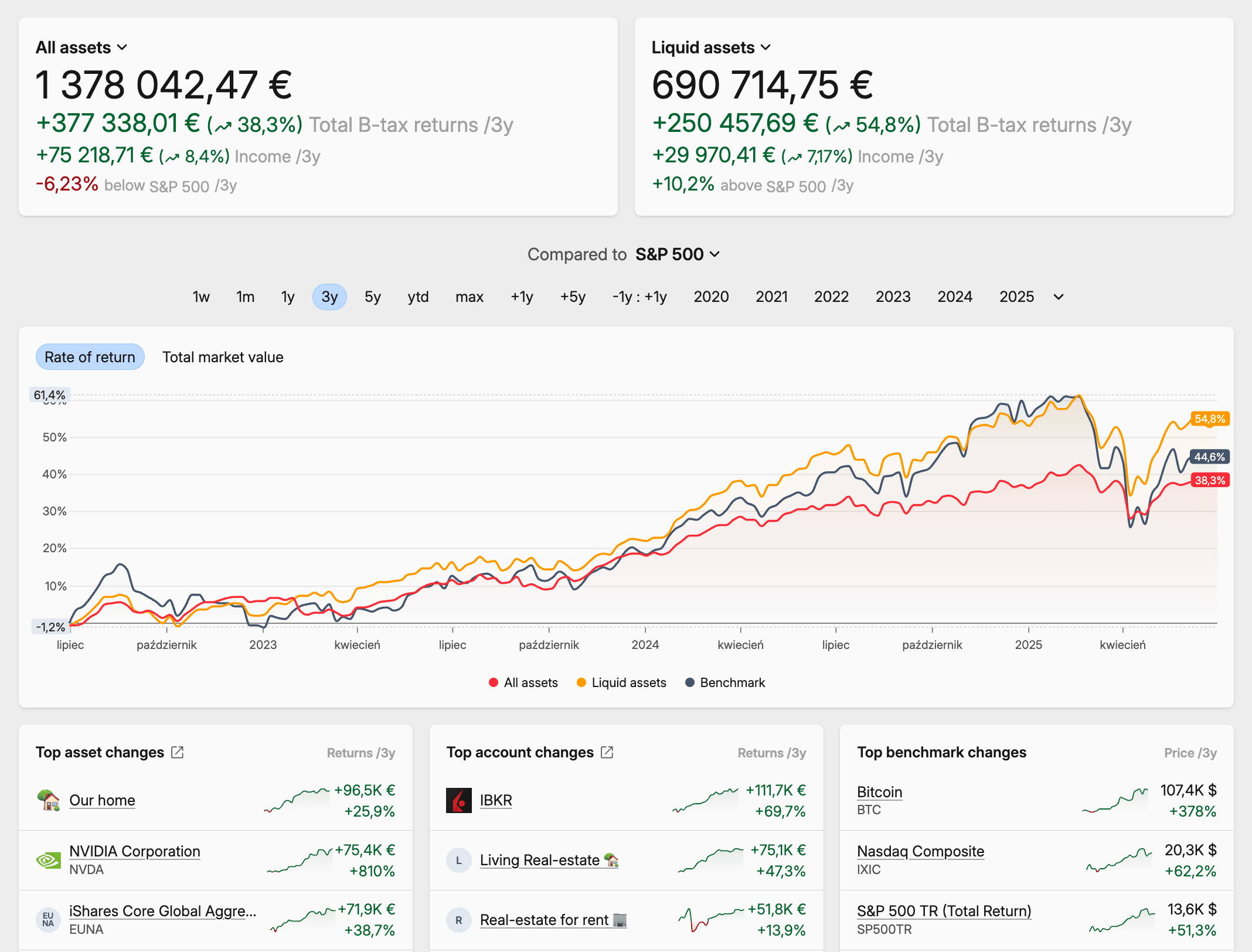 Capitally portfolio explorer
Capitally is the best fit if you want maximum control over both your data and your analysis. Founded in 2023 and based in Warsaw, it is built around on-device end-to-end encryption: your financial data is encrypted with a key derived from your password that never leaves your device, so even Capitally's own team cannot read it. Servers are in Europe under GDPR, there are no ads or third-party trackers, and you can export everything at any time.
Its asset coverage is the broadest here. Capitally tracks stocks, ETFs, bonds, mutual funds, crypto, commodities, real estate and rental income, private equity, art and collectibles, P2P loans, and stock options across roughly 400,000 indexed instruments, and treats loans and mortgages as first-class liabilities — with automatic interest accrual and amortization — plus margin and short positions through negative-quantity holdings. Analysis happens in a Portfolio Explorer, a pivot-table-and-chart hybrid with TWR, MWR, IRR, FX attribution, and custom charts over any period or metric. It imports from 70+ brokers by statement upload, and has capital-gains tax presets for eleven jurisdictions with six cost-basis methods.
The trade-off is that Capitally is hands-on. There is no automatic broker sync — you import statements yourself — no real-time market data (prices are end-of-day or delayed), no rebalancing engine, and no programmatic or AI/MCP access yet. Pricing is €80, €130, or €250 per year depending on how many projects and which advanced features — private equity, options, margin — you need, with a 14-day trial and no credit card required. For an investor who would rather paste a CSV than hand a broker password to an aggregator, that workflow is the point.
Kubera: best for a simple, automated net-worth balance sheet
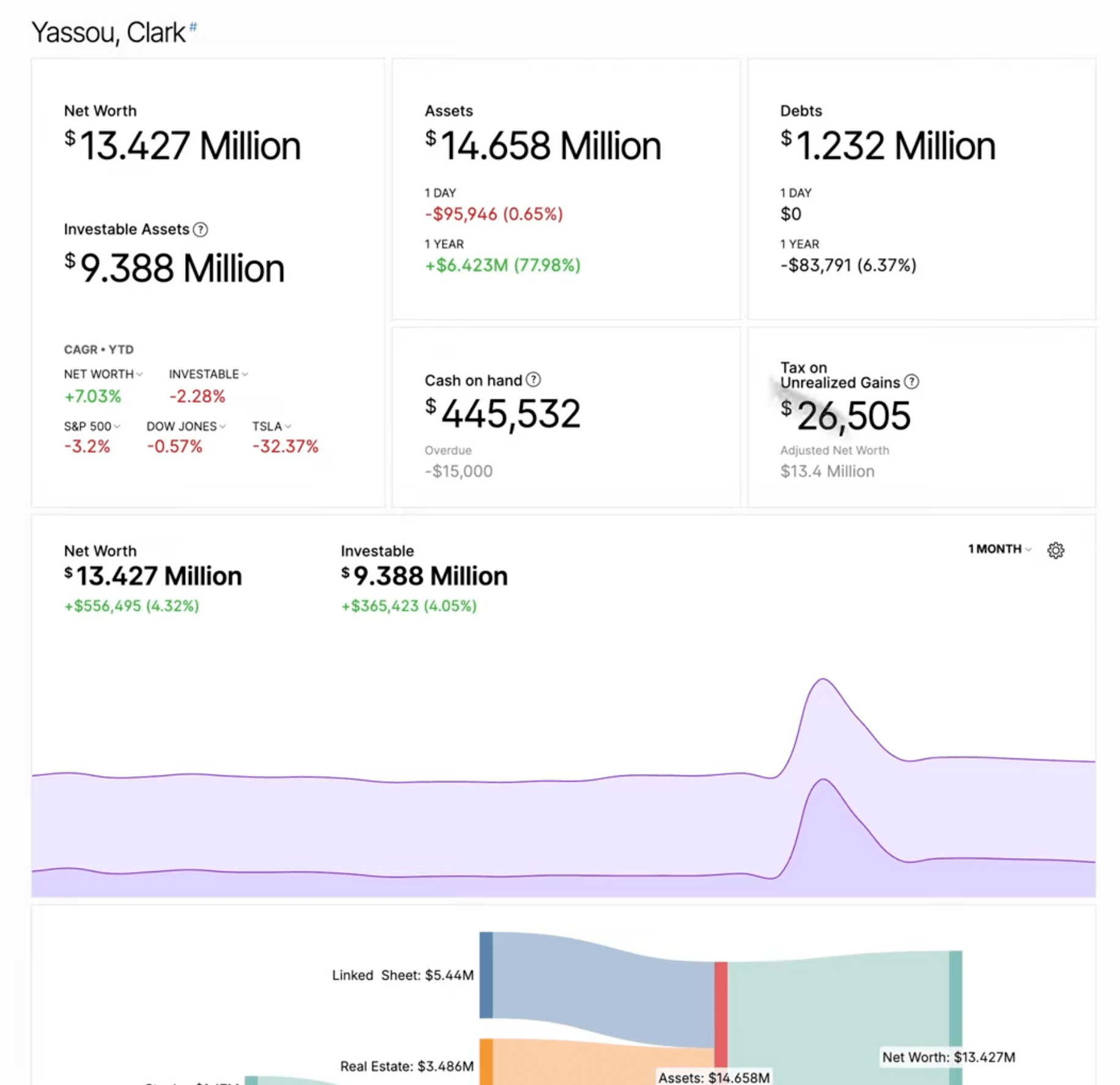 Kubera net worth dashboard
Kubera is the best fit if you want the simplest possible view of your total net worth and value automation over depth. Founded in 2019, it presents your wealth like a clean, well-organised spreadsheet that updates itself. It connects to thousands of banks, brokerages, and crypto venues through nine aggregators, values hard-to-price assets like property and collectibles with an AI Appraiser, and includes Life Beat, an estate-handover feature that can grant a beneficiary access after a period of inactivity. Kubera now also exposes your portfolio to AI assistants — ChatGPT, Claude, Perplexity, Gemini — through an MCP integration that none of the other three offer.
The trade-off is that Kubera is a balance sheet, not a portfolio analyser, by design. It tracks current balances rather than a transaction ledger, so there is no per-lot cost basis, no dividend analytics, and only a rough manual tax estimate. Pricing is a flat $250 per year for the Essentials plan; the $2,500-per-year Black tier adds nested portfolios for trusts and family entities, and there is no free plan. For estate planning and a fast net-worth snapshot it does a real job — our full Kubera vs Capitally comparison goes deeper — but investors who need to analyse performance or prepare tax reports will find it thin.
Sharesight: best for automated dividend and tax reporting on listed securities
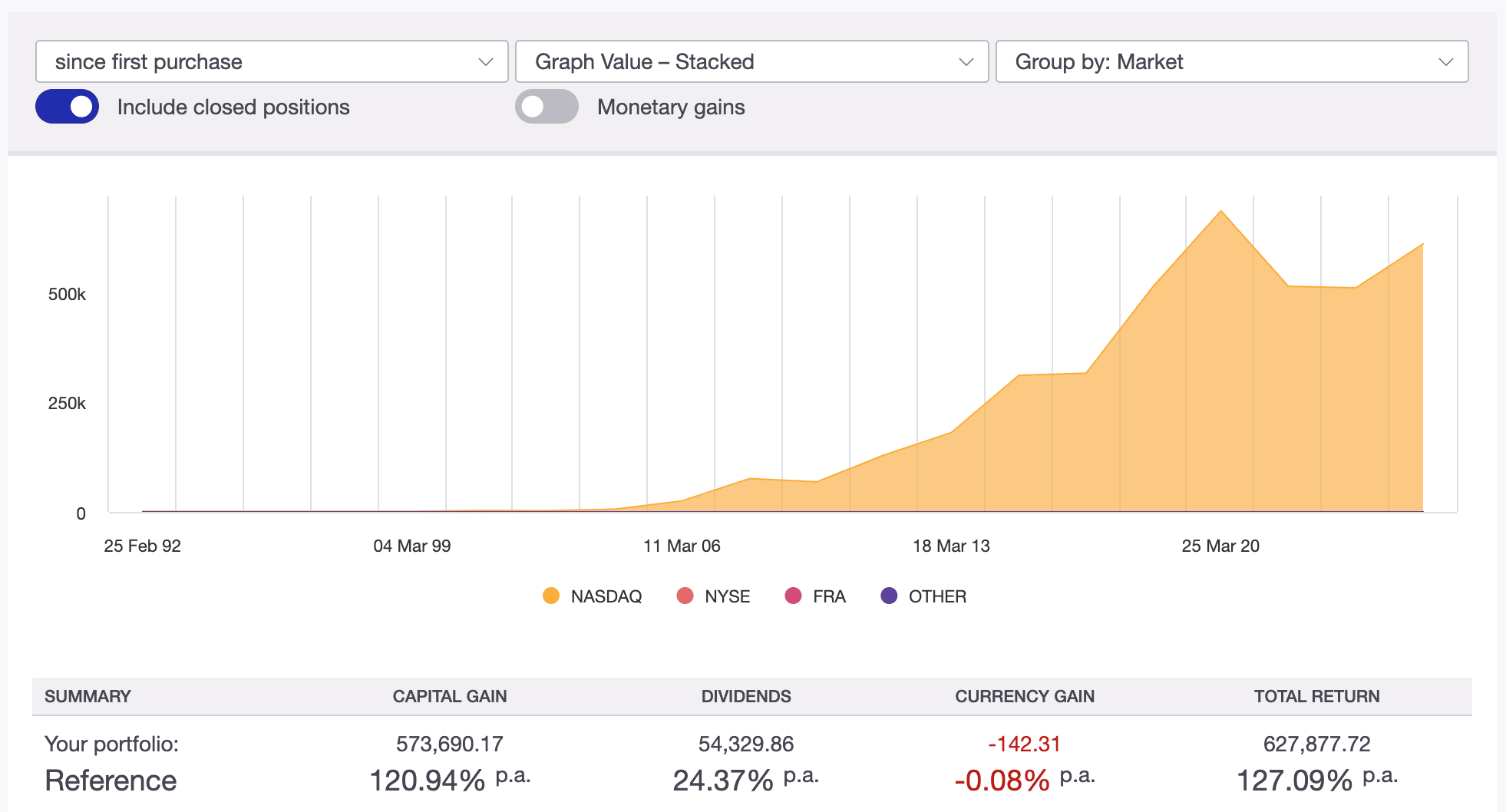 Sharesight performance report
Sharesight is the best fit if your portfolio is concentrated in publicly traded stocks and ETFs and you file taxes in a country it supports. Around since 2007 and based in Australia, it built its reputation on automatic dividend tracking and country-specific tax reporting for Australia, New Zealand, Canada, the UK, and the US. It connects to roughly 240 brokers, processes corporate actions automatically for supported markets, and — like Capitally — separates capital gains from currency gains in its performance numbers. It earned SOC 2 Type 2 certification in May 2025, and through 2025 and 2026 added fixed income, precious metals, and ETF look-through reporting.
The trade-off is that Sharesight is built for listed securities and little else. Real estate, private equity, and other alternatives can be added as custom investments but behave as second-tier entries, and there is no liability tracking. Each account is locked to a single base currency chosen at setup. Pricing runs from a capped free plan through Starter at $7 per month, Standard at $18, and Premium at $23.25, with a 7-day trial and a shared demo portfolio for evaluation. Our full Sharesight review covers where it fits in detail.
Snowball Analytics: best for dashboard-driven strategy and goal tracking
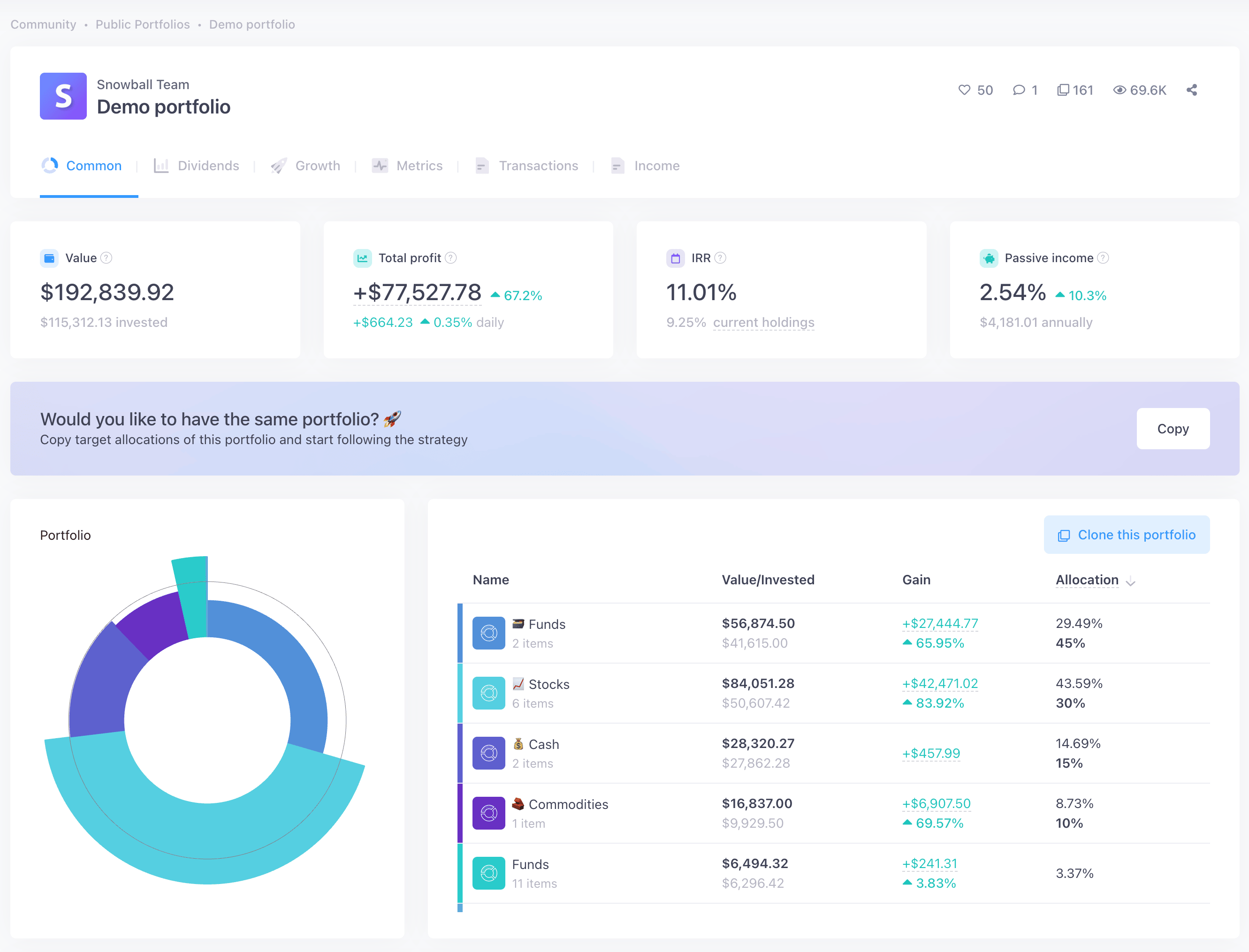 Snowball Analytics dashboard
Snowball Analytics is the best fit if you want a clean, modern dashboard with portfolio-strategy tools and your holdings are mainstream. Launched in 2022 and based in Lyon, it targets passive and FIRE investors: you can set target allocations and it will suggest trades to rebalance, backtest allocation strategies, and track a goal for portfolio value or passive income with inflation and contribution assumptions. It also has a dividend calendar with a 12-month income forecast, a proprietary Dividend Rating, a drag-and-drop customizable dashboard, and native iOS and Android apps.
The trade-off is a narrower asset and analytics model. Snowball natively supports stocks, ETFs, crypto, mutual funds, cash, and commodities; bonds and options are not native types, custom assets lack class-specific logic, and there is no liability tracking. It has TWR and MWR but no FX-versus-capital attribution, and no cost-basis methods or capital-gains tax reports. Like Sharesight, it relies on aggregators for sync and loads third-party ad trackers in-app. Pricing is a capped free plan plus Starter at $79.99 per year, Investor at $149.99, and Expert at $249.99, with a 14-day trial. Our full Snowball Analytics review has the detail.
Common questions about portfolio trackers for DIY investors
A quick reference for the questions that come up most when choosing between these four.
It depends on how complex your portfolio is. For depth and breadth — multiple currencies, alternative assets, options, and liabilities, with TWR, MWR, FX attribution, and specific-lot tax accounting — Capitally is the most capable of the four. For automated tax reporting on listed securities, Sharesight is strong; for rebalancing and goal-based strategy, Snowball Analytics; for a simple automated net-worth view, Kubera. Advanced investors who prioritise data privacy and analytical depth over automation tend to land on Capitally.
Capitally. It is the only one of the four with on-device end-to-end encryption — your data is encrypted with a key derived from your password that never leaves your device, so the company itself cannot read it — and it never connects to your bank or broker through an aggregator; you import broker statements manually. Kubera, Sharesight, and Snowball Analytics all use aggregators such as Plaid, Yodlee, or SnapTrade and standard server-side security, and Sharesight and Snowball also load third-party ad trackers in-app.
Capitally is the only one of these four that does all three properly. It has first-class asset types for real estate and rental income and for private equity with capital calls and distributions, and it treats loans, mortgages, and margin as liabilities with automatic interest accrual — so your net worth reflects what you owe, not just what you own. Kubera can hold these as manual balances. Sharesight and Snowball Analytics are built for listed securities and do not track liabilities at all.
Capitally and Sharesight both separate capital return from currency return, so you can see whether a gain came from the asset or the exchange rate. Capitally goes further with a dedicated currency-returns metric that works across any base and viewing currency. Snowball Analytics and Kubera let you view your portfolio in different currencies but do not attribute return to FX versus capital, so multi-currency investors lose part of the picture with those two.
Kubera is worth it if you want a simple, automatic net-worth balance sheet plus estate-handover and AI-access features, and you do not need performance analytics or tax reports — the price is flat whether you track $250K or $2.5 billion. If you want a transaction ledger, cost-basis tax accounting, dividend analytics, or FX attribution, Capitally covers more ground at €80–€250 per year. Our full Kubera vs Capitally comparison has a side-by-side.
Choose Sharesight if your portfolio is mostly listed stocks and ETFs and you file taxes in Australia, New Zealand, Canada, the UK, or the US, where its automated dividend tracking and country-specific tax reports do the most work. Choose Capitally if you hold multiple currencies, alternative assets, options, or liabilities, want FX attribution and six cost-basis methods, and prefer on-device end-to-end encryption over automatic broker sync.
Conclusion
The right portfolio tracker depends on which of three things you weigh most heavily: privacy, the breadth of what you can track, or hands-off automation.
Capitally is the strongest choice for privacy-conscious investors with complex portfolios. It is the only one of the four with on-device end-to-end encryption, the only one that treats real estate, private equity, options, and liabilities as first-class, and the deepest on performance analytics — TWR, MWR, FX attribution, and six cost-basis methods. The cost is a hands-on, manual-import workflow and no real-time data.
Kubera is the choice for a simple, automated net-worth balance sheet with estate-planning and AI-access features.
Sharesight is the choice for automated dividend and tax reporting when your portfolio is listed securities in a country it supports.
Snowball Analytics is the choice for a clean dashboard with rebalancing and goal tracking on mainstream holdings.
If your wealth spans multiple currencies, account types, and asset classes — and you would rather not hand your broker credentials to an aggregator to track it — Capitally is built for exactly that investor.