Command palette
Press /, Ctrl+K (⌘K on a Mac), or click the magnifier in the top bar, and start typing. One box now searches the whole project — assets, accounts, transactions, tags, categories, regions, sectors, markets, currencies and bookmarks — together with every command in the app, from Go to Taxes report to a metric, period or filter. Enter opens the result. → lists what you can do with it, such as editing an asset or showing its history, without leaving the page you're on.
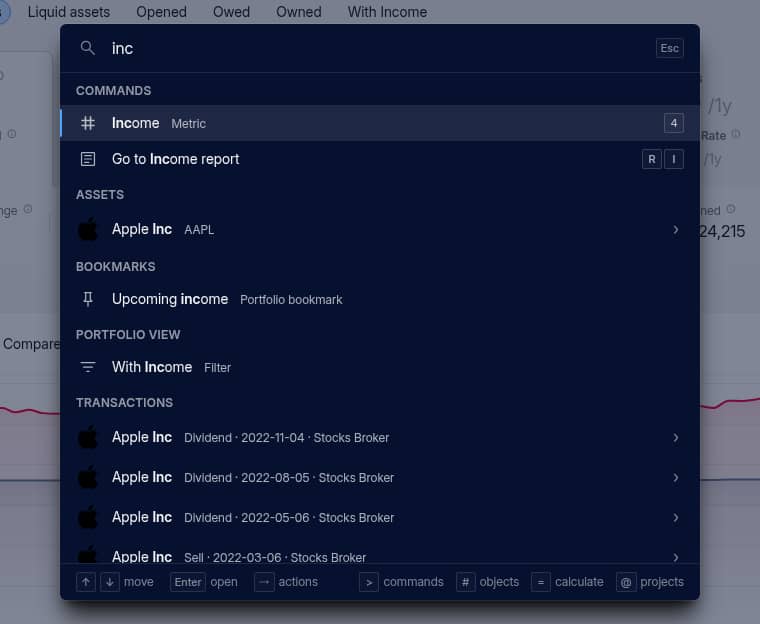
The palette reads the same syntax as Portfolio table search: commas for alternatives, - to exclude, * and ? wildcards, and "quoted phrases", which now work in tables too. Start with > to search only commands, # only assets, accounts, transactions and other objects, or @ your projects. Opened empty, it lists what you last viewed and ran on that device.
Keyboard shortcuts
Meny commands have a shortcut, shown next to it in the palette. Press ? for the full list. A few to start with:
GthenP,S,R,IorHopens Portfolio, Summary, Reports, Import or History;RthenI,RorTopens the Income, Risk or Taxes report1–9switch the Portfolio metric,Shift+1–Shift+0the groupingAadds what fits the page, such as an account on the Accounts tab;Shift+Aalways adds an assetSsaves the view as a bookmark,G 1–G 0opens your pinned bookmarksZandShift+Zundo and redo,Thides your numbers,Lswitches between light and dark
See Search and keyboard shortcuts for the rest.
Calculator
Type a calculation into the palette — 217,79 + 100, or anything after = — and the result shows first. Enter copies it. Press = anywhere to open straight into the calculator.
Other changes
- Group headers in tables show the group's totals.
- Table search adds
?for exactly one character, and each term matches a whole word, sosoc genno longer finds Société Générale whilesociete gendoes. - Long return charts, income columns, reports and tax calculations are faster.