TL;DR
getquin is a free, automated wealth platform with real-time prices, AI portfolio analysis, and a social investing community. It is quick to set up when your brokers are supported, but it stores your data on its servers, keeps performance analysis shallow, and has no tax tools.
Capitally is a privacy-first tracker for serious DIY investors: on-device end-to-end encryption, professional-grade analytics (TWR, MWR, FX attribution), and coverage for almost any asset class — in exchange for a hands-on, manual-import workflow and a paid-only plan.
- Choose getquin for a free, low-effort tracker with AI-generated guidance and a community to learn from.
- Choose Capitally if privacy is non-negotiable, your portfolio spans multiple asset classes and currencies, or you need analysis and tax reporting a brokerage statement cannot give you.
Table of Contents
- TL;DR
- At a glance: getquin vs Capitally
- Data import and broker connections
- Asset coverage and liabilities
- Performance analysis
- Privacy and security
- AI features and financial planning
- Multi-currency
- Tax support
- Pricing
- getquin and Capitally together
- Which one should you choose?
- Common questions about getquin and Capitally
Tracking a portfolio in Europe rarely means one broker and one currency. It usually means several accounts, a few currencies, and — increasingly — assets that do not fit neatly into a stock screener. The tool you choose shapes how clearly you see your real returns, your tax position, and your true net worth.
This is a head-to-head between two European platforms that solve that problem very differently. getquin is a Berlin-based wealth platform that leans on automation, AI analysis, and a half-million-strong investing community. Capitally is a privacy-first tracker built for investors who want control: every number is computed on your own device, from data you import yourself.
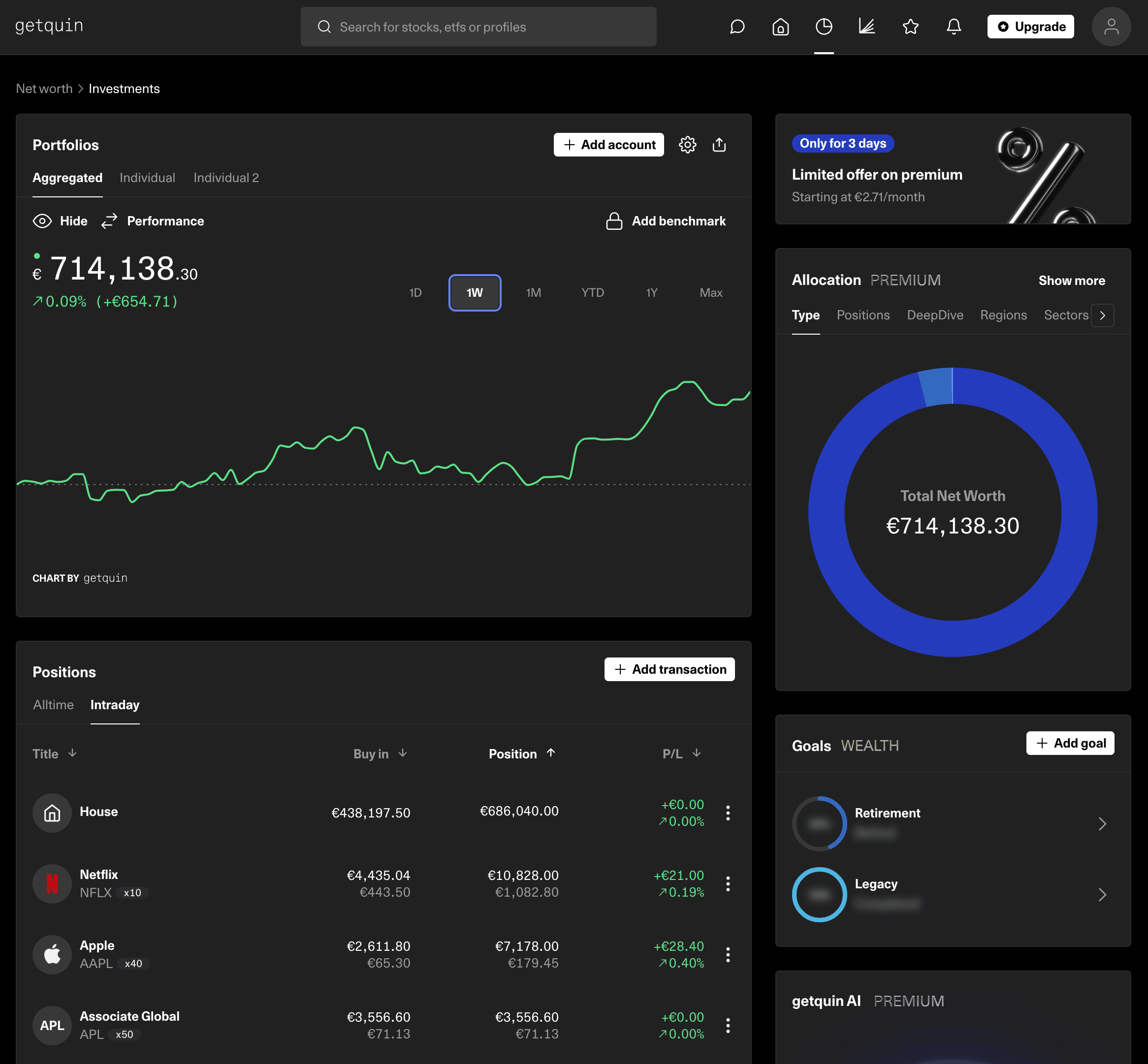 getquin dashboard
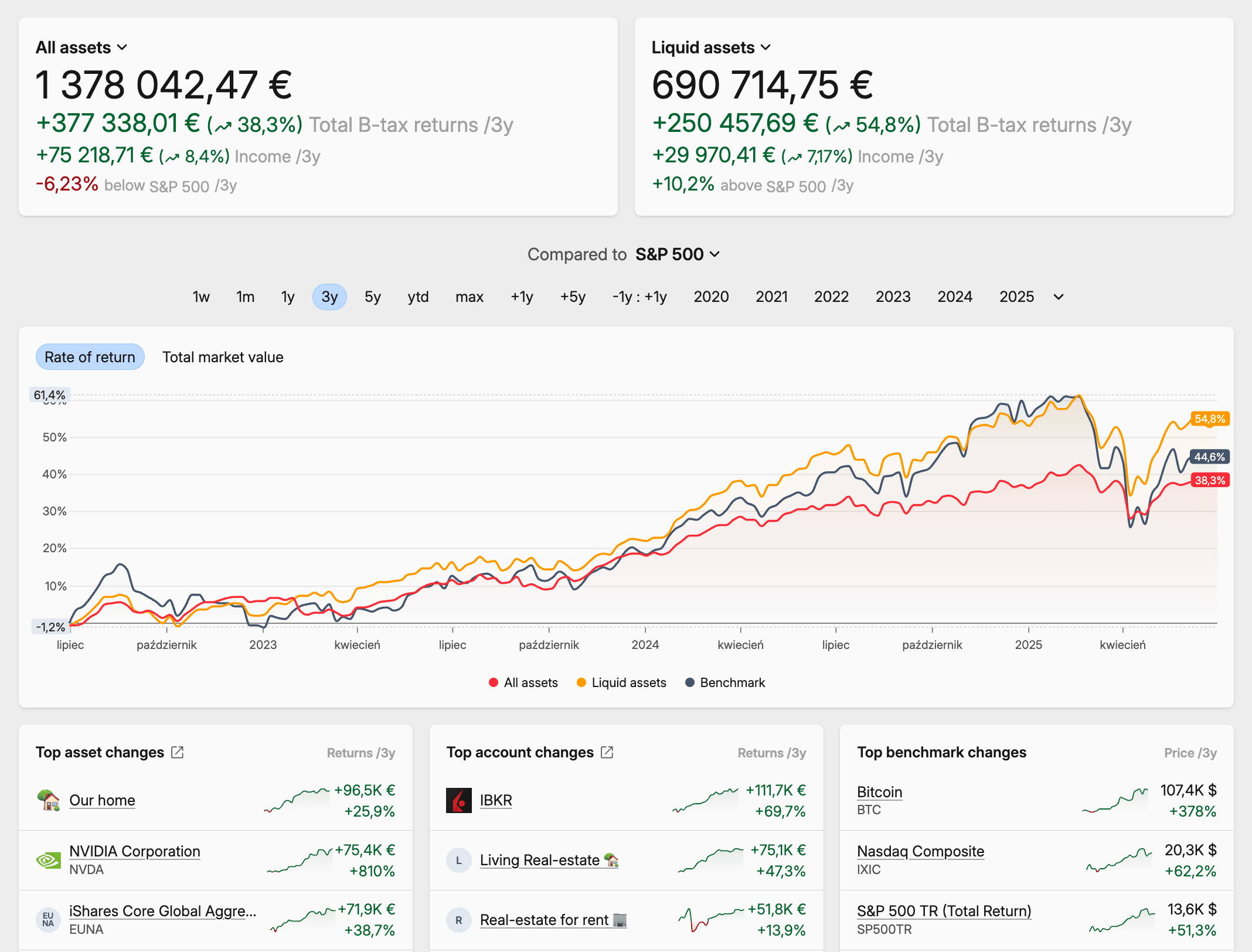 Capitally dashboard
At a glance: getquin vs Capitally
getquin and Capitally both track a portfolio across accounts and currencies, but they sit at opposite ends of the convenience-versus-control spectrum. getquin automates data collection and layers AI analysis on top; Capitally keeps your data encrypted on your device and gives you the tools to analyze it yourself. The table below summarizes where each one leads.
Feature | getquin | Capitally |
|---|---|---|
Best for | Hands-off investors who want a free tracker with AI guidance and a community | Privacy-conscious investors with complex, multi-asset, multi-currency portfolios |
Founded | 2020, Berlin | 2023, Warsaw |
Asset coverage | Stocks, ETFs, funds, crypto, bonds; basic custom assets | Stocks, ETFs, crypto, bonds, options, real estate, private equity, art, P2P loans, plus any custom asset |
Liabilities | ❌ Not tracked | First-class: mortgages, loans, margin, short positions |
Data import | Automated aggregator sync that shares broker credentials; manual one-by-one entry; no working CSV import | Manual broker-statement import from 70+ brokers; flexible CSV/Excel importer with reusable presets |
Multi-currency | Converts everything to one base currency | Separates capital return from currency return (FX attribution) |
Performance analysis | Predefined reports; true TWR and benchmarking on Premium | Portfolio Explorer with custom charts, filtering and grouping; MWR, TWR, IRR; up to 10 benchmarks |
AI features | AI portfolio analysis, AI financial planning, a paid AI Advisory tier | No AI agent by design; all calculations run on-device |
Privacy & security | Standard server-side encryption; no 2FA; no data export | On-device end-to-end encryption; EU hosting; full export anytime |
Tax support | ❌ ccd None | Capital-gains calculation, presets for 11 jurisdictions, FIFO/LIFO/ACB and more |
Platforms | Web plus native iOS and Android apps | Web and mobile as an installable app (PWA), works offline |
Pricing | Free, ad-supported; Premium ~€49.99/yr; paid AI Advisory tier on top | Sailor €80/yr, Navigator €150/yr, Captain €300/yr; 14-day trial |
Free option | Yes — free tier | No — 14-day trial only |
Data import and broker connections
getquin gets your data in two ways: automated sync through third-party aggregators, or manual entry one transaction at a time. The aggregator route is convenient when your broker is supported — but it asks you to share your broker login and 2FA codes with a third party, and for many institutions, Interactive Brokers among them, it pulls only current balances rather than full transaction history. getquin's marketing site mentions CSV upload, but the app itself has no working CSV or Excel import, so an unsupported broker means entering trades by hand.
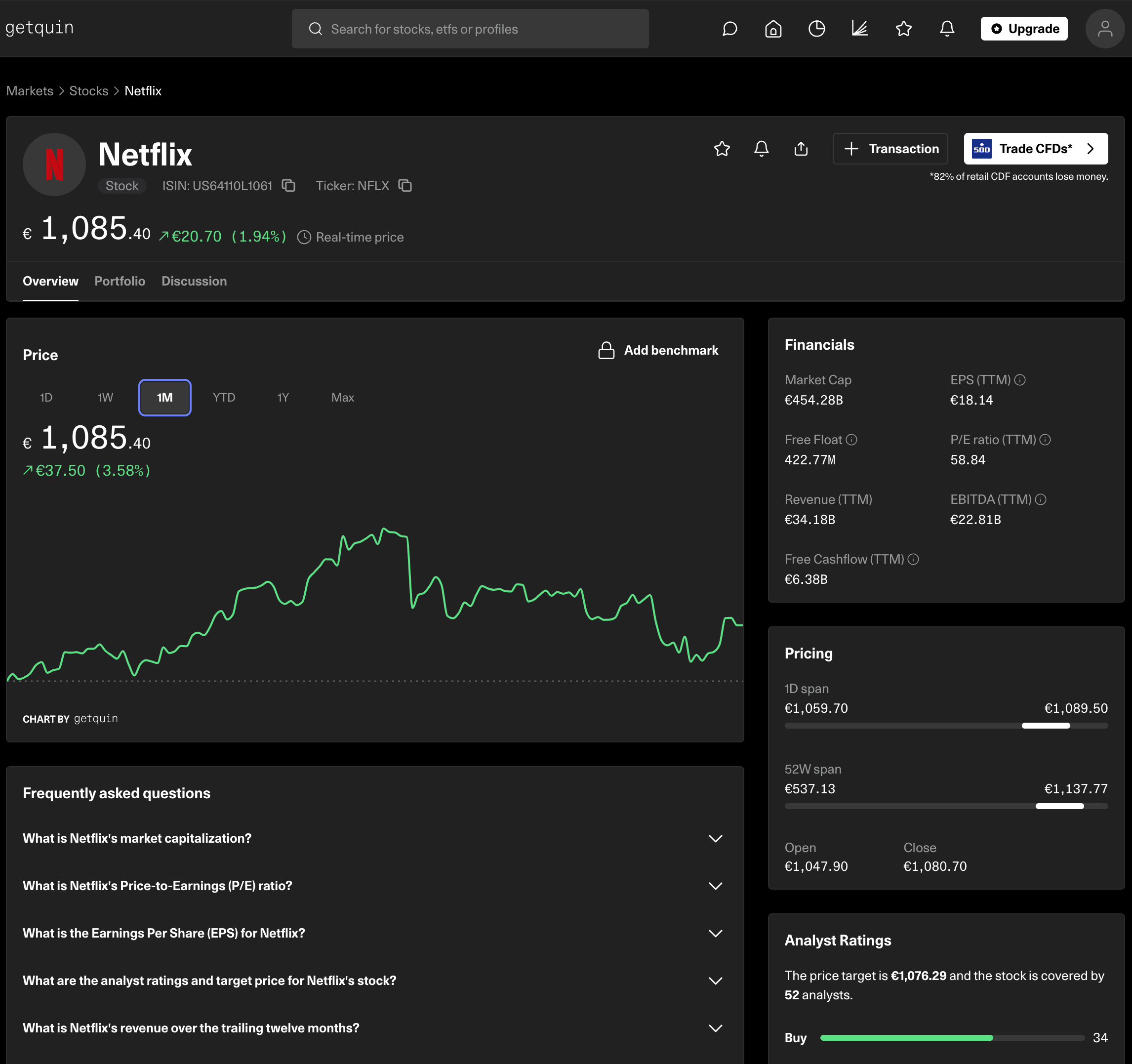 getquin single asset view
Capitally takes the opposite approach: you export a statement from your broker and import it yourself. It supports 70+ brokers this way, and its importer can map any CSV, Excel file, or pasted table, saving the logic as a reusable preset for next time. Because the data comes straight from the broker, it carries every corporate action, dividend reinvestment, and currency conversion, going back to the day the account opened — which makes it a reliable basis for a tax filing, something an aggregator's balance snapshot structurally cannot be.
Asset coverage and liabilities
getquin covers the mainstream well — stocks, ETFs, funds, bonds, and crypto, drawn from a database of recognized instruments. Custom assets like real estate or collectibles are supported, but only at a basic level: you update the value by hand, there is no historical price import, no dedicated asset view, and they do not feed the diversification charts. There is no liability tracking — recent marketing copy lists "liabilities" as a connectable category, but the product has no first-class support for mortgages, loans, or margin.
Capitally treats every asset class as first-class. Alongside stocks, ETFs, bonds, and crypto, it has dedicated handling for options (with Greeks), private equity (with the full fund lifecycle), real estate with rental income, P2P loans, art, and any custom asset you define — all of it feeding the same analytics and diversification views. Liabilities are built in: mortgages, loans, margin, and short positions are tracked as first-class items, and any asset becomes a liability when its quantity goes negative.
Performance analysis
getquin shows a fixed set of predefined reports: portfolio performance, asset allocation, and transaction history over standard time periods. Its Premium tier adds a true time-weighted return (TWR) and benchmarking against market indices. What you cannot do is customize, filter, or group those reports — most metrics stay at the whole-portfolio or single-asset level, so comparing one slice of your portfolio against another is not possible.
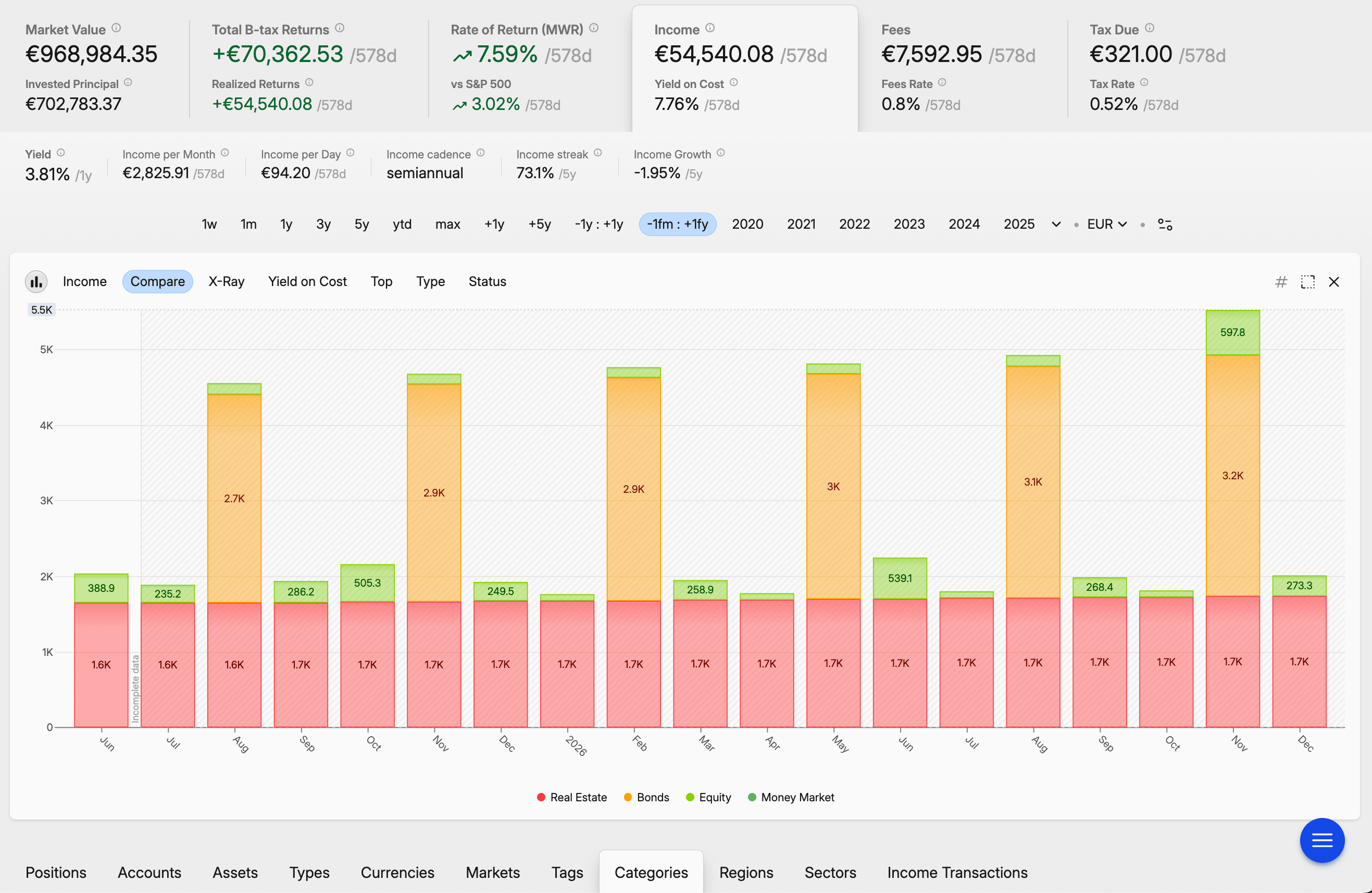 Capitally's future income analysis
Capitally is built around a Portfolio Explorer — a pivot table fused with a charting engine. You pick from dozens of metrics, group by any dimension, filter positions with custom logic, and chart the result as a line, bar, heatmap, or volatility view. It computes money-weighted return (MWR), time-weighted return (TWR), and IRR, and lets you stack up to 10 benchmarks — including a position-prices benchmark that answers "what would my return be if I had never traded?". Comparing your European small-caps against your US holdings over the last 18 months, excluding what you have already sold, is a few clicks here.
Privacy and security
getquin follows standard industry practice: HTTPS in transit, encryption at rest, and your data held on its servers. Because it began as a social platform, sharing is core, and your data has to be readable server-side for its features to work. There is no two-factor authentication and no simple data export, and the aggregator syncs route your broker credentials through third parties — there are documented user reports of suspicious broker-login activity after enabling sync.
Capitally is built privacy-first. Your financial data is encrypted on your device with a key derived from your password that never reaches Capitally's servers, so even Capitally cannot read it. All calculations run locally, servers are hosted in the EU under GDPR, and you can export everything at any time. For high-net-worth investors, public figures, or anyone who simply treats financial data as private, this is the platform's defining feature.
AI features and financial planning
getquin has leaned heavily into AI since 2025. It offers AI-driven portfolio analysis covering exposure, a risk rating, and a fee breakdown; an AI financial planner that generates a retirement or financial-independence plan in minutes and updates it as your accounts change; and a separate paid AI Advisory tier for deeper guidance. If you want a tool that interprets your portfolio for you, this is getquin's clearest recent strength — though it carries a structural cost: for an AI to analyze your holdings, your financial data has to be readable on getquin's servers.
Capitally takes a deliberate position here: no AI agent, no automated advice. That is a consequence of the privacy architecture, not an oversight — server-side AI and on-device end-to-end encryption are fundamentally at odds. If your data never leaves your device in readable form, there is nothing for an AI on a server to read. So Capitally invests in the other direction: analytics you can audit, where every metric is computed locally with the methodology visible, so you can see exactly why a number is what it is. The trade is real — interpretation you do yourself, in exchange for data only you can read.
Multi-currency
getquin supports multiple currencies by converting everything into a single base currency for reporting. That is enough to see one bottom-line number, but it hides how much of your return came from the markets and how much came from currency moves.
Capitally separates capital return from currency return in every calculation. If your US holding rose 10% in dollars while the euro strengthened 5%, you see both components, not just the blended figure, and you can switch viewing currency instantly. For an expat — or anyone holding assets across the EU, US, and UK — that FX attribution is the difference between knowing your performance and guessing at it.
Tax support
getquin has no tax functionality — no capital-gains calculation, no tax reports, no cost-basis tracking, and no tax-loss harvesting. Because its historical performance is often balance-based rather than transaction-based, it cannot serve as a record for a tax filing, and there is no transaction export to take elsewhere.
Capitally includes capital-gains tax calculation with ready-made presets for 11 jurisdictions: the US, UK, Netherlands, Poland, Czech Republic, Australia, Belgium, Canada, Germany, France, and Sweden. It supports FIFO, LIFO, highest-cost, lowest-cost, average cost basis (ACB), and manual lot selection, and it flags tax-loss-harvesting opportunities with the exact quantity to sell. The tax logic is editable, and the report is built to hand to an accountant.
Pricing
getquin is free at its core: the ad-supported tier covers broker connections, real-time prices, the dividend calendar, and full community access. Premium runs about €49.99 a year and adds long-term dividend forecasting, the true TWR figure, and benchmarking. A separate paid AI Advisory tier sits on top for AI-driven planning and advice.
Capitally has no free tier — there is a 14-day trial with no card required, then three annual plans: Sailor at €80 (one project, 50 assets), Navigator at €150 (five projects, unlimited assets, more benchmarks), and Captain at €300 (unlimited projects, plus options, margin, and private-equity tracking). Options and private-equity tracking sit on the top tier. Whether it is worth it comes down to one question: if accurate tax reporting, FX attribution, or a single better allocation decision saves you more than the subscription, it pays for itself.
getquin and Capitally together
You can use both, and some investors do — but keep the roles clear. getquin's free tier, real-time prices, fundamentals screener, and community are useful for discovering ideas and keeping an eye on the market. Capitally is where the portfolio of record lives: the encrypted data, the performance and tax analysis, the complete net-worth picture. getquin can sit beside Capitally as a research feed, but it is not a substitute for the tracking, privacy, and analysis Capitally is built to provide.
Which one should you choose?
These tools serve different investors with different priorities.
getquin is the better fit if you want a free, low-effort tracker, your brokers are supported by its aggregators, and you value AI-generated guidance and a community to learn from. It is a reasonable starting point for newer investors with straightforward portfolios who are comfortable with their data living on a company's servers.
Capitally is the better fit if privacy is non-negotiable, your portfolio spans multiple asset classes, currencies, or accounts, or you need analysis and tax reporting that a brokerage statement and a free tracker cannot provide. It asks for a more hands-on workflow in return for control, depth, and end-to-end encryption that no aggregator-based platform can match.
If you are weighing the two, the deciding questions are simple: how much of your wealth sits outside mainstream stocks and ETFs, and how much does it matter that no one but you can read your financial data? The more either answer points to "a lot", the more Capitally earns its place.
If you are also looking at other trackers, see our Kubera review, Sharesight review, and Snowball Analytics review.
Common questions about getquin and Capitally
getquin uses standard security — encrypted connections and server-side encryption at rest — but it is not end-to-end encrypted, so your financial data is readable on its servers. It has no two-factor authentication, and its automated sync routes broker credentials through third-party aggregators, with documented user reports of suspicious broker-login activity after enabling it. Thousands of people use getquin without incident, but privacy-conscious investors should weigh those trade-offs. A tracker like Capitally, which encrypts data on your device so even the company cannot read it, removes the question entirely.
Yes — getquin has a free, ad-supported tier that covers broker connections, real-time prices, the dividend calendar, and community access. Premium costs about €49.99 a year and adds long-term dividend forecasting, true time-weighted return, and benchmarking, with a separate paid AI Advisory tier on top. Capitally, by contrast, has no free tier: it offers a 14-day trial, then plans from €80 a year.
getquin is a Berlin-based wealth platform, founded in 2020, that combines portfolio tracking with a social investing community and — since 2025 — AI portfolio analysis and financial planning. It has more than 500,000 users and tracks over €20B in assets. It began as a social-investing app and has since repositioned around AI-driven analysis and retirement planning.
Not directly — getquin has no data export, so you cannot download your transaction history from it. The practical route is to skip getquin as a source and import your history straight from your original broker statements into Capitally, which usually produces more complete data anyway. It is a one-time effort, and a reminder of why data ownership matters: Capitally lets you export everything at any time.
With getquin, a shutdown means losing your data — there is no export option, so your only recourse would be recording your holdings by hand before the service ends. Capitally is built differently: regular exports mean you always hold a backup, the app works offline, and the import and export formats are open, so your data stays usable in a spreadsheet or another tool.