Compare your real return — the part that beats inflation, an index, or any benchmark of your choice. The new Discount by option subtracts a benchmark from your rate of return, so you see what's left after taking that benchmark out.
When to use it
- Am I actually building wealth? Discount by your country Consumer Price Index (e.g. US CPI or Poland HICP) to see real return after inflation. A 7% nominal return with 3% CPI shows up as ~4%.
- Am I beating the market? Discount by S&P 500 or MSCI World to see your alpha — the part of your return that isn't just market beta.
- Is my property outpacing the local market? Discount real-estate holdings by Germany HPI, UK HPI, or any other house price index.
- Is cash still worth it? Discount by US 10Y Government Bond to see whether your portfolio is earning more than near-risk-free yield.
How to find it
Open the Rate of Return tab in Portfolio and pick a benchmark from the Discount by selector — right next to the regular benchmark picker. Recently used benchmarks, the predefined CPI/HICP list, and your own project benchmarks all appear there.
The discount applies to every rate-of-return metric — TWR, IRR, and ROI alike. For a fair, apples-to-apples view, the benchmarks and individual asset price returns you're comparing against get discounted too — so everything you see is measured in the same units.
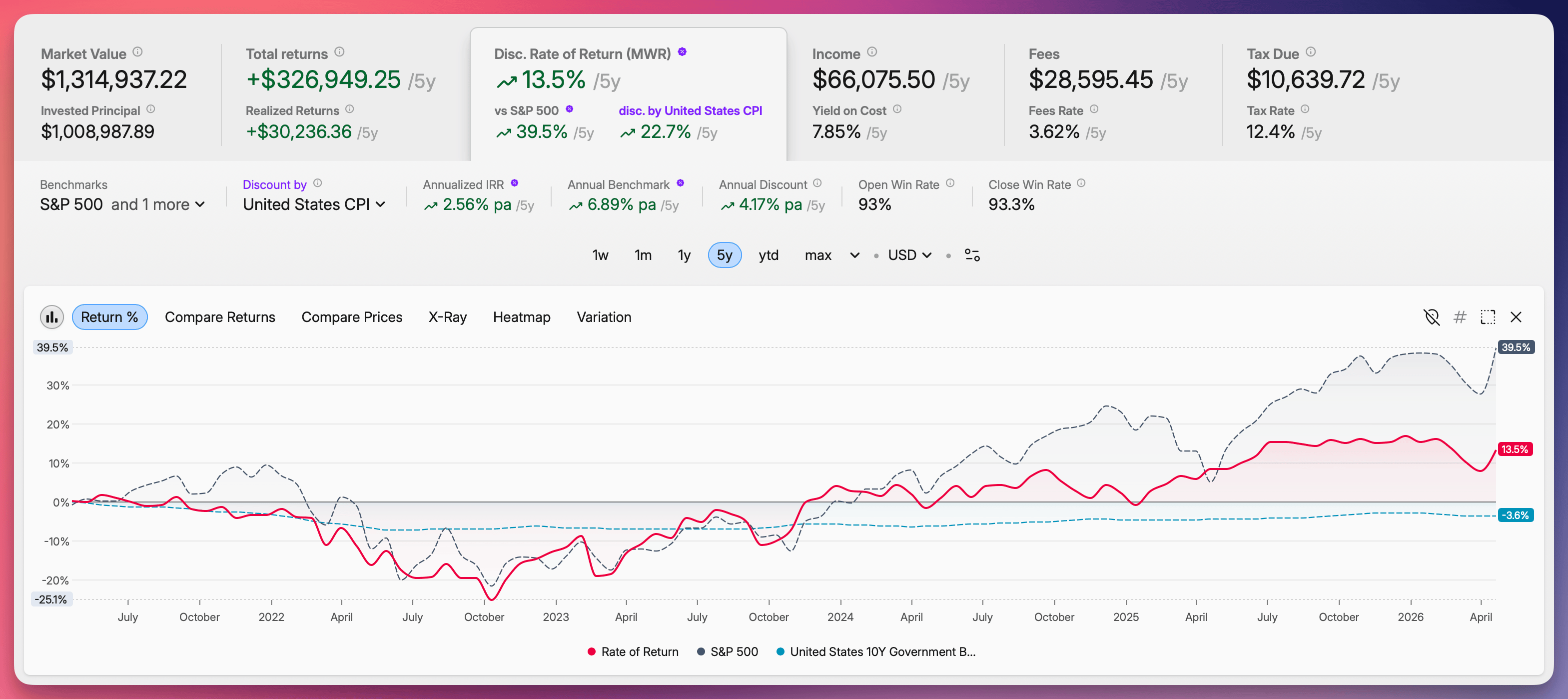 The Rate of Return tab in Portfolio with the Discount by selector next to the Benchmark selector — a portfolio line and an S&P 500 benchmark both shown in real terms after discounting by US CPI
Learn more in our Benchmarks guide.