Benchmarks are the yardsticks you use to judge your portfolio's performance. Without one, a 10% return is just a number — with one, you can tell whether you actually beat the market, kept pace with it, or trailed behind.
In Capitally, a benchmark is anything that has a price series over time: a market index (S&P 500, MSCI World), an ETF or stock, a custom price series you imported, or even your own portfolio positions. You can add several benchmarks at once and see them all alongside your returns on the charts and in the table.
Adding a benchmark
Open the benchmarks selector from the Portfolio view and pick anything that has a price series:
- Market indexes like the S&P 500, MSCI World, Nasdaq 100, or DAX
- ETFs or individual stocks — just search for a ticker and add it
- Custom assets you created yourself, including any black-box investment with a manually tracked price
- Filters, Accounts and Account Folders
- Currencies — the benchmark is then that currency's move against the one you're viewing in, so USD viewed in EUR plots the dollar against the euro. Pick the currency the view is already in and the line sits flat at 0%
- Economic indicators — real-world economic data like inflation (CPI, HICP), house prices (HPI), bond yields, and central bank rates, sourced from Eurostat, the OECD, and the World Bank. See Economic indicators below
- Your own positions — see Position-prices benchmark below
Once added, the benchmark appears on rate of return charts.
The Summary page keeps its own benchmark setting, and changing it there does not change the one in Portfolio. Summary also states the comparison differently: it shows the difference between your return and the benchmark's, where Portfolio plots the benchmark's own return next to yours. Because of that, setting the Summary benchmark to the project's own currency reads your return against a flat zero.
Managing your benchmark list
Choose Edit benchmarks from the benchmark menu to permanently add or remove entries. That list is what the benchmark selector offers you everywhere in the app. Around 1,500 indexes ship built in, searchable by name or symbol — they carry a line-chart icon, and typing a general term such as index browses them.
Pick None to drop the benchmark line from a chart entirely — with several benchmarks selected the option reads Clear. If you clear the list by accident, benchmarks can be added back from any benchmark selector in the app.
Benchmarks follow the view, not the asset
A benchmark can't be pinned to a particular asset — move to another asset and the selection reverts to the default. Save the view as a bookmark instead: the saved state includes the chosen benchmark, so one click restores the exact configuration.
When the index you want isn't available
Some indexes aren't licensed for redistribution and so aren't in the built-in data. Two ways around it:
- Use an ETF that tracks the index as a proxy — an S&P 500 ETF instead of the index itself. Expect a small gap from tracking difference and fees.
- Create a custom asset and import a price history for it. That is the same route described under If there's no built-in indicator below, which also covers turning a rate series into prices.
Comparing against multiple benchmarks
You're not limited to picking one. Select up to 10 benchmarks at the same time and Capitally will draw them all on the same chart. This is useful when a single index doesn't tell the full story — for example, comparing a global portfolio against both the S&P 500 and MSCI World, or stacking a sector ETF next to a broad market index to see which one you're actually tracking.
Position-prices benchmark
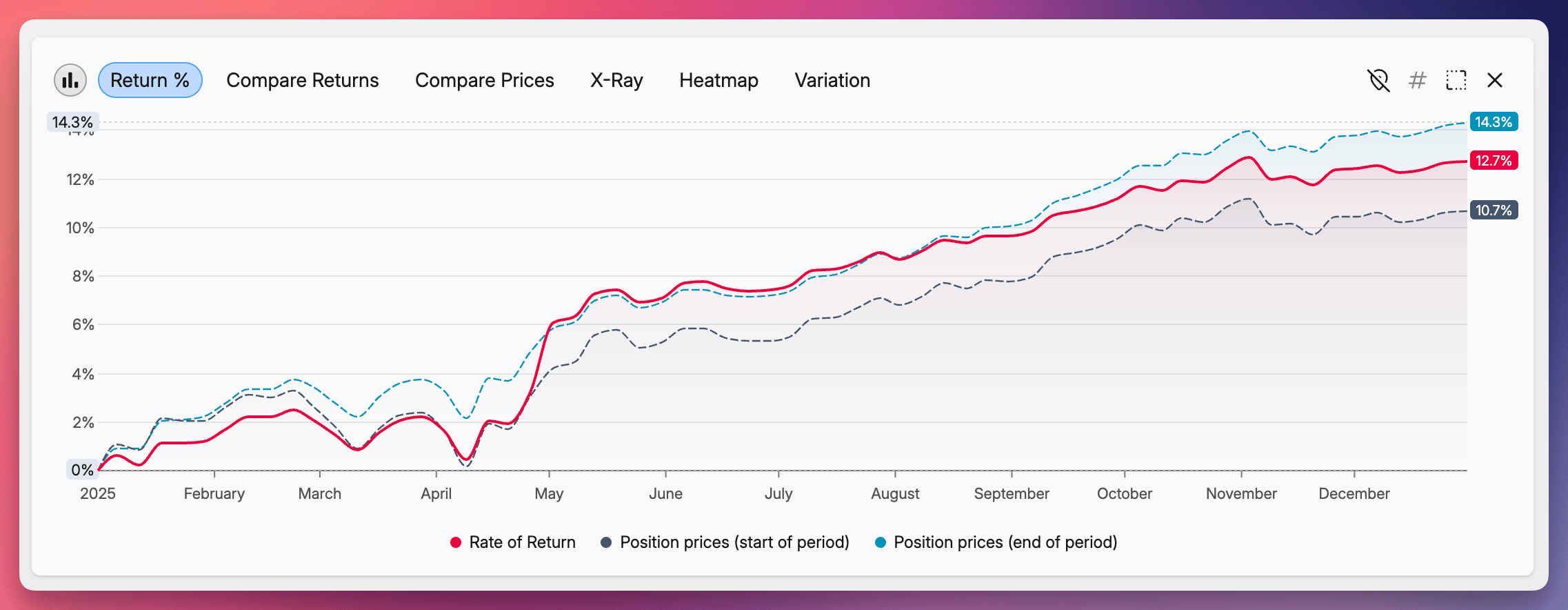
The position-prices benchmark answers a different question: what would my return have been if I hadn't traded at all during this period?
Instead of comparing you to an external index, Capitally builds a hypothetical version of your own portfolio that holds a fixed allocation through the whole period — no buys, no sells. The difference between your actual return and that hypothetical return isolates the effect of your trading activity.
You can choose which allocation to hold constant:
- Position prices (start of period) — keeps the allocation you actually had at the start of the selected period. Answers "what if I'd done nothing since the start?".
- Position prices (end of period) — projects the allocation you ended the period with back to the beginning. Answers "what if I'd held today's mix the whole time?" for a closed period.
- Position prices (today) — uses your current allocation. Answers "what if I'd always held what I hold now?".
Example
Open 2025 with the start of period option. You'll see the return of a portfolio that, on January 1st 2025, held exactly what you held, and didn't touch it for the rest of the year. If your actual 2025 return is higher, your trades added value. If it's lower, you'd have been better off doing nothing.
Economic indicators
Beyond stock indexes and ETFs, you can benchmark your portfolio against real-world economic data. Capitally provides a library of macroeconomic indicators for 60+ countries, sourced directly from Eurostat, the OECD, and the World Bank. Use them to answer questions a market index can't:
- Am I keeping up with inflation? Add US CPI or Poland CPI next to your portfolio and check whether your return line sits above or below it.
- How does my real-estate portfolio compare to the overall housing market? Germany HPI or UK HPI show the average movement of home prices in that country — a natural yardstick for any property you hold there.
- Is cash still a reasonable choice? US 10Y Government Bond Yield or Eurozone Central Bank Rate show what a near-risk-free return would have looked like over the same period.
- How is the broader economy doing? France GDP or Japan GDP give you a long-term macro reference to compare against.
Available indicators:
- CPI — Consumer Price Index (national)
- HICP — Harmonised Index of Consumer Prices (EU-wide methodology)
- HPI — House Price Index
- CBRATE — Central Bank policy rate
- GB3M / GB10Y — 3-month and 10-year government bond yields
- GDP — GDP growth
Search for them in the benchmark picker by country name (e.g. "Germany stats") or indicator name (e.g. "DE-CPI").
Nominal comparison
Economic indicators are shown as benchmarks against your nominal portfolio return. The comparison is side-by-side: if your portfolio line sits above CPI, you're growing in real terms; if it sits below, you're losing purchasing power. For a single combined number — your return minus the indicator — use Discounting by a benchmark instead.
If there's no built-in indicator
If Capitally doesn't carry the series you need, build it yourself as a custom asset. The one rule that trips people up: a benchmark needs a price series, not a rate. Enter cumulative index levels, so a 10% year followed by a 5% year reads 1 → 1.1 → 1.155, never 0.10 and 0.05.
- Create a custom asset named after the series.
- Convert the rates into cumulative levels as above.
- Paste the price history as two columns — date and price.
- Type the asset's name into the benchmark selector.
Discounting by a benchmark
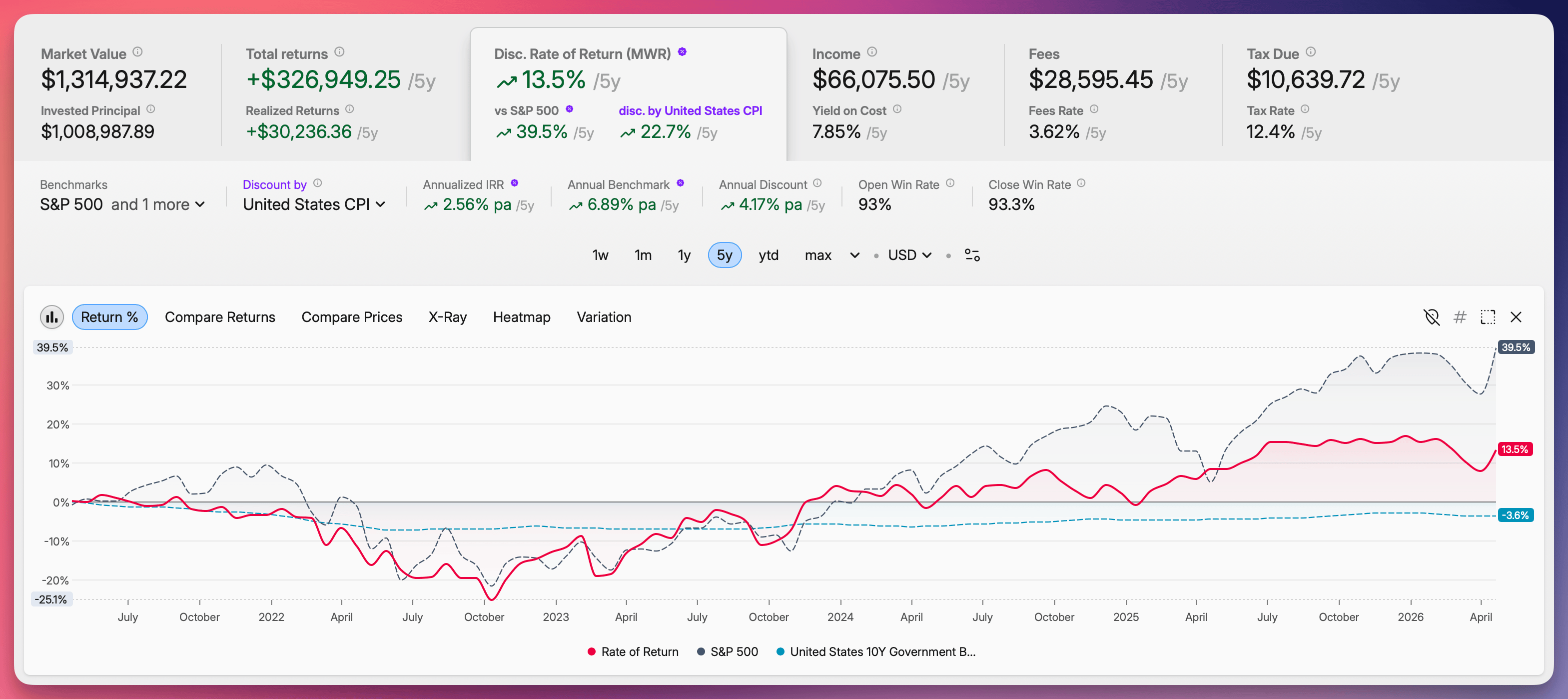
Side-by-side isn't the only way to use a benchmark. With Discount by, Capitally restates your portfolio's rate of return in units of the benchmark — what's left is your real return (after inflation) or excess return (after the market).
Open the Rate of Return tab in Portfolio and pick a benchmark from the Discount by selector, right next to the regular benchmark picker. Recently used benchmarks, the predefined CPI/HICP list, and your own project benchmarks all appear there.
Some examples of when each one is useful:
- Discount by US CPI or Poland HICP — your real return after inflation. A 7% nominal return with 3% CPI shows up as ~4%.
- Discount by S&P 500 or MSCI World — your alpha vs the market.
- Discount by Germany HPI or UK HPI — how your real-estate holdings performed against the local housing market.
- Discount by US 10Y Government Bond Yield — your premium over a near-risk-free rate.
The discount applies to every rate-of-return method, and the math follows the method:
- TWR and ROI divide growth factors over the same period:
(1 + your return) / (1 + benchmark return) - 1. - MWR (IRR) deflates the cash flows first. Your opening value, every deposit and withdrawal, included fees and income, and the closing value are each divided by the benchmark's growth since the start of the period, and the IRR is solved on those adjusted flows. With CPI that is the IRR of your purchasing power; with an index it is a Direct Alpha style excess IRR. Adjusting the finished IRR by the benchmark's endpoints would only be right without deposits and withdrawals in between — a portfolio that tracks its benchmark exactly reads 0% whatever you paid in or took out along the way. If the benchmark has no level on a day a cash flow lands on, the discounted MWR shows
NaNinstead of quietly falling back to the nominal rate.
For a fair, apples-to-apples comparison, the benchmarks and individual asset price returns you're comparing against get discounted by the same series too — so everything on the chart is in the same units.
How benchmarks are calculated
A benchmark return is a plain price return: (ending price / starting price) - 1. It accounts for no cash flows, fees, taxes or inflation — deliberately, because it measures what the index itself did over the period, not what you did. Values are converted into your selected viewing currency using daily FX rates, so the two rates stay directly comparable.
Because a benchmark has no cash flows in the middle, ROI, TWR and IRR all produce the same benchmark number. The only exception is annualized IRR, which adjusts for the length of the period. That is why switching your rate of return method moves your own line but leaves the benchmark where it was.
There is one exception to the price-return rule. When the benchmark is an Account, a Filter, or your own portfolio, it is calculated exactly like your portfolio — cash flows and all — so the comparison stays apples-to-apples.
Your own return is a different calculation:
- ROI —
cash_flows_out / cash_flows_in - 1, ignoring when the money moved. - IRR (MWR) — weights both the timing and the size of every cash flow.
- TWR — removes the effect of cash flows entirely. A position you held for the whole comparison period should track the benchmark closely under TWR.
Reading the benchmark chart
The benchmark is drawn over the same date period as the rest of the view, and every chart starts at the end of the day before the first date shown. Both of those explain most of the surprises people report — a benchmark that doesn't start at zero, or one that disagrees with the figure quoted elsewhere.
Setting the comparison period
Use the period selector to align the comparison with the range you care about. max covers your full holding period, and longer presets pull in more of the benchmark's own history. You can also click and drag across the chart to select a custom range.
Why the chart doesn't start at zero
Charts start at end-of-day on the day before the first plotted date, so anything that happened on the very first day — a price move, a fee, a premium — is captured. A year-to-date chart therefore starts at 31 December, 23:59:59, and will not read exactly zero if the benchmark or your portfolio moved between 31 December and 1 January. Max and Hold charts do start at zero when the series covers the whole range, because the from-date sits one day before the first transaction, as does any chart whose first day had no market activity — after a weekend, for instance. Your own series, built-in benchmarks and custom benchmarks all behave the same way.
Why year-to-date differs from Google Finance
Capitally measures year-to-date from the 31 December close, so the first trading day's move is inside the number. Google Finance measures from the close of the first trading day, which leaves that move out. If the S&P 500 rose on 2 January, Capitally's YTD includes that gain and Google Finance's does not.
Discounting a series by itself shows 0%
Discount by measures everything on the chart against the chosen series — your portfolio, the benchmarks and the individual assets — so that all of it is in the same units. A series that is also displayed, Poland CPI discounted by Poland CPI for example, therefore draws as a flat 0%. That is the definition working as intended, not a defect.
Tips
- Reorder your list under Settings → Benchmarks, the screen that adds, deletes and reorders entries. Your saved benchmarks sit at the top of every selector in that order, above anything the search turns up.
- Combine an external benchmark (e.g. S&P 500) with the position-prices (start of period) benchmark to see two very different comparisons side by side: "did I beat the market?" and "did I beat just holding still?".
- Use the Discount by selector to convert any benchmark from a side-by-side comparison into a baseline your return is measured against — useful for showing real (after-inflation) or excess (after-market) return as a single number.