Capitally allows you to monitor the current market value of your real estate, along with all related income and expenses, giving you a comprehensive overview of your investment. Please note that market prices are not automated, and you will need to update them manually.
Organizing your real estate portfolio
You can organize properties in several ways:
One account per property - Create a separate account for each property (e.g., "Downtown Apartment", "Beach House"). This approach works well when you want to:
- Track a mortgage alongside the property in the same account
- See the net equity (property value minus mortgage) at a glance
- Keep all property-related transactions together
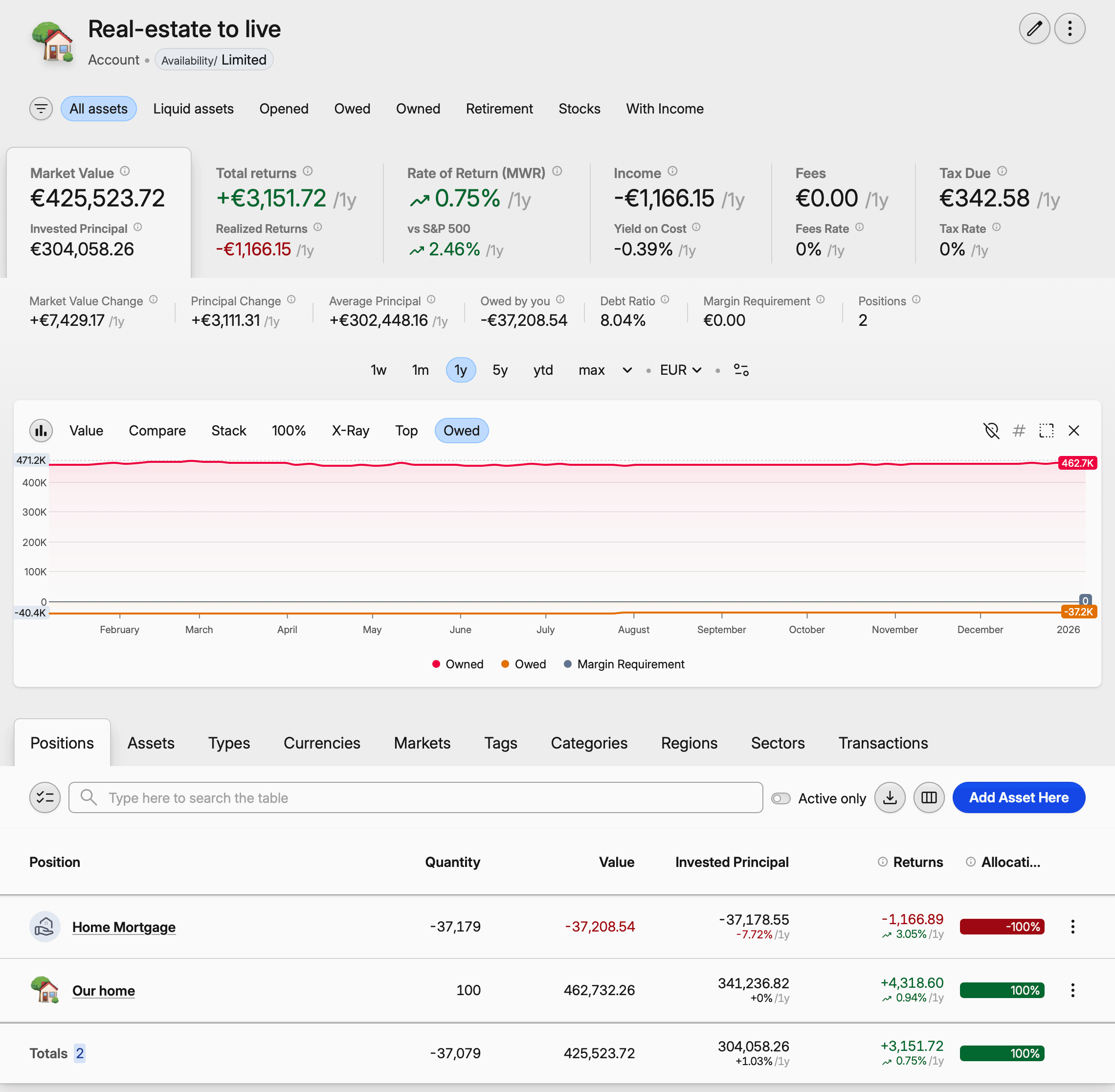
Single account for all properties - Create one "Real Estate" account containing all your properties as separate assets. This works better when:
- You don't have mortgages to track
- You prefer simpler organization
- You want to quickly compare properties side by side
Using taxonomies - Add tags and categories to categorize properties by ownership (Owner/Me, Owner/Partner), location, or type (Real-estate/Rental, Real-estate/Primary Residence).
Adding a property
Create a custom asset for each unit you own, then record a Buy transaction for the purchase. What you enter as Quantity decides how you will revalue the property later, so pick one of three approaches and keep it for the life of the asset.
- Per unit — quantity
1, price the full purchase price. The simplest option, and the right one if you value the property as a whole. - Per square meter — quantity the floor area (say
100), price the purchase price divided by it: 500,000 / 100 =5,000per sqm. Useful where local valuations are published per square meter, because you can copy a figure straight in. - Partial ownership — quantity the share you hold (
0.25for a 25% stake), price scaled to the whole property. The position then carries a quarter of the value and a quarter of the gain.
Tracking rental income
If you're renting out your property, track income using Rent transactions.
Recording monthly rent
- Open the property asset
- Click Add transaction
- Select Rent as the transaction type
- Enter the rent amount in Value
- If tax was withheld, enter it in Tax Paid
- Add Fees for any property management costs deducted from rent
Recurring rent payments
To quickly add multiple rent payments:
- Create one rent transaction
- Select it in the Transactions tab
- Click Edit & Clone
- Set the number of copies and interval (e.g., 12 copies, 1 month apart)
Future income estimation
Capitally can estimate future rental income based on your payment history. See Tracking Dividends - Future income estimation for details.
Tracking Expenses
Track property-related costs using Other transactions.
One-off expenses
For renovations, repairs, or one-time purchases, use negative Value in the Other transaction. It will only affect the ROI and won't be reflected in Fees.
Recurring expenses
For regular costs like property tax, insurance, or maintenance contracts, use Fees, keeping Value field at 0 in the Other transaction. This will affect both ROI and the Fees metrics.
Example: Annual property tax
- Add an
Othertransaction - Set Value to
0 - Set Fees to the tax amount (e.g., 1,200 EUR)
- Add a note: "Annual property tax 2024"
How costs affect Principal and Returns
Money spent after the purchase — renovation, equipment, agency fees, running costs — does not change Invested Principal, which holds what you paid for the property itself and nothing else. Costs land in Realized Returns instead, alongside the rent you take in: both are results of owning the property rather than additions to what you put into it.
To read capital committed with those costs folded back in, use Invested Principal − Realized Returns, remembering that rent received nets against the costs inside that same figure. Portfolio metrics covers how the two reconcile.
Other transactions behave the same way whether you enter them as a negative Value or as Fees: they move ROI and Realized Returns, never Invested Principal.
If you would rather have fit-out or equipment spend counted as invested capital, there is a supported alternative:
- Create a second custom asset in the same account as the property — "Downtown Apartment — fit-out", for instance — with a fixed price of
1. - Record each purchase as a
Buyon that asset, with the quantity equal to the amount spent.
Every purchase then raises that account's Principal, and the account total reads as the property plus everything you put into it.
Keep the two apart: recording a cost never changes what the property is worth. If the work raised its market value, record that separately as a price update — see Updating Market Price below.
Financing with a mortgage
If your property is financed with a mortgage, you can track both together and see your true equity position.
See Tracking Mortgage for:
- Setting up a mortgage with interest calculations
- Connecting the mortgage to your property
- Viewing combined equity (property value minus debt)
Updating Market Price
Update the price, never the quantity — the amount of property you own has not changed. You do not need to keep the price current either: set a future-dated price and Capitally interpolates the values across the dates in between, so revaluing every couple of months is enough for accurate tracking.
Four ways to record a new value, all covered in Setting custom asset prices:
- Open the asset, go to the Prices tab and add a row with the date and the new price.
- Double-click the position in the Positions tab and edit the market price — check that the date selector at the top is set to the date you mean.
- Add an Account Balance transaction carrying the updated market price.
- Import prices from a CSV, which is quickest if you keep valuations in a spreadsheet.
Don't edit the original Buy transaction
Returns are the difference between the price on the Buy transaction and the latest price entry. Editing the Buy to the property's new value makes both numbers identical, and the position shows a 0% return however much it has appreciated. Leave the Buy at what you paid and add today's value as a separate dated price — see why an updated value still shows a 0% return.
If you've been tracking all this data in a spreadsheet, you can create an import template and import everything in one go. If you plan to track the expenses and income in a spreadsheet or app alongside Capitally, remember that you can also create a template for Copying & Pasting the data, saving you the trouble of exporting it.
Projecting future growth
Capitally applies no automatic appreciation rate, but a future-dated price does the same job. At 5,000 per sqm today and 10% expected growth, enter 5,500 with next year's date and the months in between fill in by interpolation. You can type the arithmetic straight into the price field — 5000 * 1.1 works.
Exploring Your Real Estate Portfolio
Portfolio section allows you to compare the fixed income of all the assets in your portfolio, including Bonds, Stocks and Real Estate. This gives you a holistic view of the fixed-income potential of all your investments.
To see all your real estate, navigate to Portfolio → Types → Real Estate.