Polish treasury bonds
A dedicated Government Bonds importer handles Polish consumer bonds — COI, EDO and the rest. Valuations are not automatic, so re-import current values from time to time to keep them up to date. Download the bond template by right-clicking the link and choosing Save link as…, then import it by selecting Data exported from Capitally.
The importer can separate bonds by series, meaning by purchase date. When it does that while creating new assets, you get a Review items to be imported screen instead of the usual import summary. Repeated purchases of the same series on different dates are summed rather than priced from the last row. For finer granularity, edit the importer so it creates a separate security per purchase date — see importing in advanced mode.
Two artefacts of the import are worth knowing about:
- A PLN cash account appears even with cash tracking off. This happens when tax rows are not directly adjacent to the redemption or interest rows they belong to.
- Excess
Transfer Intransactions. The importer cannot track account balances, so it synthesises a transfer to fund each purchase. Set them to 0 or delete them; re-importing the same dates recreates them.
When bonds are redeemed and the proceeds immediately buy new bonds on the same account, those synthesised transfers double-count the cash. The tell is an inflated All assets figure while the with-income figure matches your real holdings. Delete the excess transfers, or set the bank (PKO) to transfer proceeds from each sale to an external account, so cash never accumulates on the bond account and the importer stops creating them.
Small differences against official valuations
Full valuations are calculated on monthly boundaries and interpolated in between, then rounded. Between payment dates that can put Capitally a small distance from the official table; on payment and accrual dates the values are calculated precisely by the day-count convention and match.
P2P lending platforms
Model a P2P platform position by unit price, not by income transactions. Lending 1,000 gives you 1,000 units at a price of 1, and the price rises to reflect the interest earned — for a 10% one-year loan, set a future price of 1.10. Change the quantity only when the loan is repaid. Both quantities and valuations can be imported from a file.
Deposit, withdrawal and profit rows usually need the transaction-type mapping adjusted with a programmable preset. If the current balance equals the amount you invested, the unit price has never been updated to reflect accrued interest.
Bonds without automatic price coverage
Government, eurozone government and corporate bonds are quoted, and attach to an asset by name, ticker or ISIN. Polish primary-market government consumer bonds are calculated instead of quoted, because their terms make the price fully predictable. Where an individual issue is missing, it is priced from prices you enter or from the bond's own interest schedule. Four routes, in order of preference:
- Price it from its own terms and a market quote. This is the setup for a coupon-paying bond bought on the secondary market. Set the asset's pricing method to
Interest, give it the coupon and the maturity date, then attach the bond underMarket prices→Source clean prices from market symbol. The quote supplies the clean price, the schedule adds the accrued interest on top, and you get a yield to maturity with it. Interest-based pricing covers the quote conventions you have to match. - Give the bond its own market symbol. Where the coupon schedule does not need modelling, create a custom asset of type
Bond, open itsPricestab and search the bond's ticker underSource prices using this market symbol. If the bond trades under its own symbol, it is then priced exactly like a stock — but without accrual, generated coupons or a yield. - Split instruments the provider merged. Several notes from one issuer are sometimes collapsed into the parent company's listing — baby bonds SCCD, SCCE and SCCF, for example. Create a separate custom
Bondasset per ticker and set each one's own market symbol so they track individually. - Update the prices yourself. Where the issue is not indexed, enter prices periodically, or load them in bulk from a CSV. On an interest-priced bond they go in
Manual clean pricesinstead, and are read in the convention that section's toggles describe: a bond quoted as a percentage of par takes 98.5, not 985.
Manual pricing does not compromise your returns. Buy and Sell prices are always used to calculate them; the market price only affects the current valuation. A bond ladder kept in your own spreadsheet can be imported in one pass with an advanced-mode preset that creates each custom bond from the file's ISIN and name, then applies its Rate p.a., Maturity date and Day count so it is priced from its own terms.
If the instrument is listed on a major exchange, send us its ISIN — we can request it from our data provider, typically with a 24-hour turnaround.
Private notes and other unlisted debt
For a promissory note or a private bond that you hold, create the custom asset as type Bond with manual pricing, or as Loan with the terms set in the Prices → Interest tab if you want interest accrued automatically. Quantity is positive when you are the lender holding the note, and negative when you are the borrower — see Tracking Debt for that side.
A Loan writes its terms on the side you owe, so for a note you hold they only accrue while Same parameters for positive and negative balances is on. A note showing no interest and no final payment date is the sign it is off.
A new custom asset stays off the Dashboard and Portfolio until it is bound to an account, so add the opening transaction straight away — Buy on a bond, Open on a loan — with the quantity set to the principal.
Bond defaults assume an exchange-traded bond
Switching a Bond to Interest pricing seeds it for a listed bond: face value 100, Market prices on, quotes read as a percentage of par. For an unlisted note there is nothing to quote it against, so set Face value to the note's own denomination and switch Market prices off.
Tracking Interest-based Assets
- Create an asset with the appropriate type (Bond or Deposit).
- Set up interest pricing. A bond starts at a face value of 100 paying an annual coupon; a deposit at 1, compounding monthly.
- Add the opening transaction —
Buyon a bond,Crediton a deposit. ItsPricearrives pre-filled with the asset's face value whenever the transaction is in the asset's own currency, and on a bond quoted as a percentage of par you can switch the field's unit to% of face valueand type the quote itself. - To ensure accurate reporting, you can either bulk-import actual interest payments or adjust the automatically generated transactions.
- Close the position early with a
Sell(Debiton a deposit), or anInteresttransaction carrying an Amortized Quantity.
Interest generated this way is paid out as a cashflow, not added back to the position, so a savings account modelled like this drifts from its real balance over time. To compound it instead, see reinvesting the interest.
Recording interest and renewing a deposit
Record a coupon or an interest payout with the Interest transaction type. If your bank or broker withheld tax at source, enter the withheld amount in the Tax Paid field on the same transaction. If the tax falls due later instead, leave Tax Paid empty and let a tax preset apply the right rate at report time — see Taxes.
Which of these figures count toward your returns — fixed income, fees, other cashflows, taxes — is set in the options menu next to the Currency selector, described under what is included in returns.
Renewing a deposit
When one deposit matures and a new one starts, add a Debit for the matured deposit and a Credit for the renewed amount. You can fold the interest into the closing value to avoid a separate transaction, but then it is not reported as Fixed Income. Adding just the new Credit for the renewed amount also works — both the value and the interest stay tracked.
For a chain of deposits that rolls over with a different rate and duration each time, set the asset up as perpetual instead of renewing it by hand: see rolling and back-to-back deposits. Accrued interest paid to the seller when you buy a bond mid-period is a different entry again — accrued interest paid at purchase covers the three ways to book it.
Reading returns on bonds and deposits
A return on a bond or deposit needs two things: the purchase transactions and a current valuation. Four results regularly look wrong and are not — each has its own explanation.
The bond shows +0
The current value is missing. Either import or enter a current valuation, or set up interest pricing so the value is calculated from the bond's own terms. Purchase transactions on their own give Capitally nothing to compare against.
A closed lot shows no return
With interest-based pricing, interest payouts are not attributed to the lot that generated them, because one payout can span several lots of the same bond. Each interest payment gets its own lot instead, so an original lot can close showing nothing. Three ways to see the whole picture:
- The Compare Returns graph aggregates across lots.
- Filter by Unit opened date isolates the lots opened on a given day, month or year, together with their income.
- Lot Groups let you assign transactions to a group and read the combined return.
The realized line sits above the total line
Returns are measured from the start of the selected period. On YTD or any other partial period, the total (red) line shows the interest accrued since that point, while realized (grey) shows the payouts received since that point. When the period starts in the middle of a compounding period, a payout can arrive that was partly accrued before the period began, which legitimately puts realized above total.
A foreign-currency deposit is up far more than its interest rate
The displayed return combines interest and exchange-rate movement. On a large deposit held in a currency that weakened against your viewing currency, the FX component can dwarf the interest. Switch the viewing currency to the deposit's own currency and the FX effect disappears, leaving the interest alone. The Breakdown chart in the Returns section splits currency, fees, taxes and income the same way — see exploring your cash accounts.
Lending through one platform on behalf of several owners
When one lending or P2P account is funded by several owners — two trusts and a pension scheme, or a company and a private person — represent the ownership split with accounts, not tags. Create an account folder named after the platform, with one account inside it per legal entity. Only accounts give each owner independent balances, income and returns; tags stay available for classification such as loan grade, borrower or term.
Create each underlying loan once as a custom asset and reuse that same asset in every account that funded it, rather than copying it per entity. Size each owner's stake with its own Buy on its own account: quantity = the amount lent, price = 1. If two entities each lend 25,000 into the same loan, that is a Buy of 25,000 at price 1 in the first entity's account and a second Buy of 25,000 at price 1 in the second entity's account.
Post interest and principal repayments against the same loan asset, each on the account that actually received the money. Each entity then carries its own balance, income and return, while opening the loan asset shows the combined position across every account.
Importing Interest-based Assets
An import template can create bonds or deposits, add their transactions and set up the interest schedule from the same file. In advanced mode, it can map Rate p.a., Maturity date and Day count columns into each asset's pricing terms, which is useful when a bank provides a file or table with the details.
Use Use interest-based pricing, Set interest parameters and Add interest parameters in an advanced-mode preset to configure the starting terms and any dated changes.
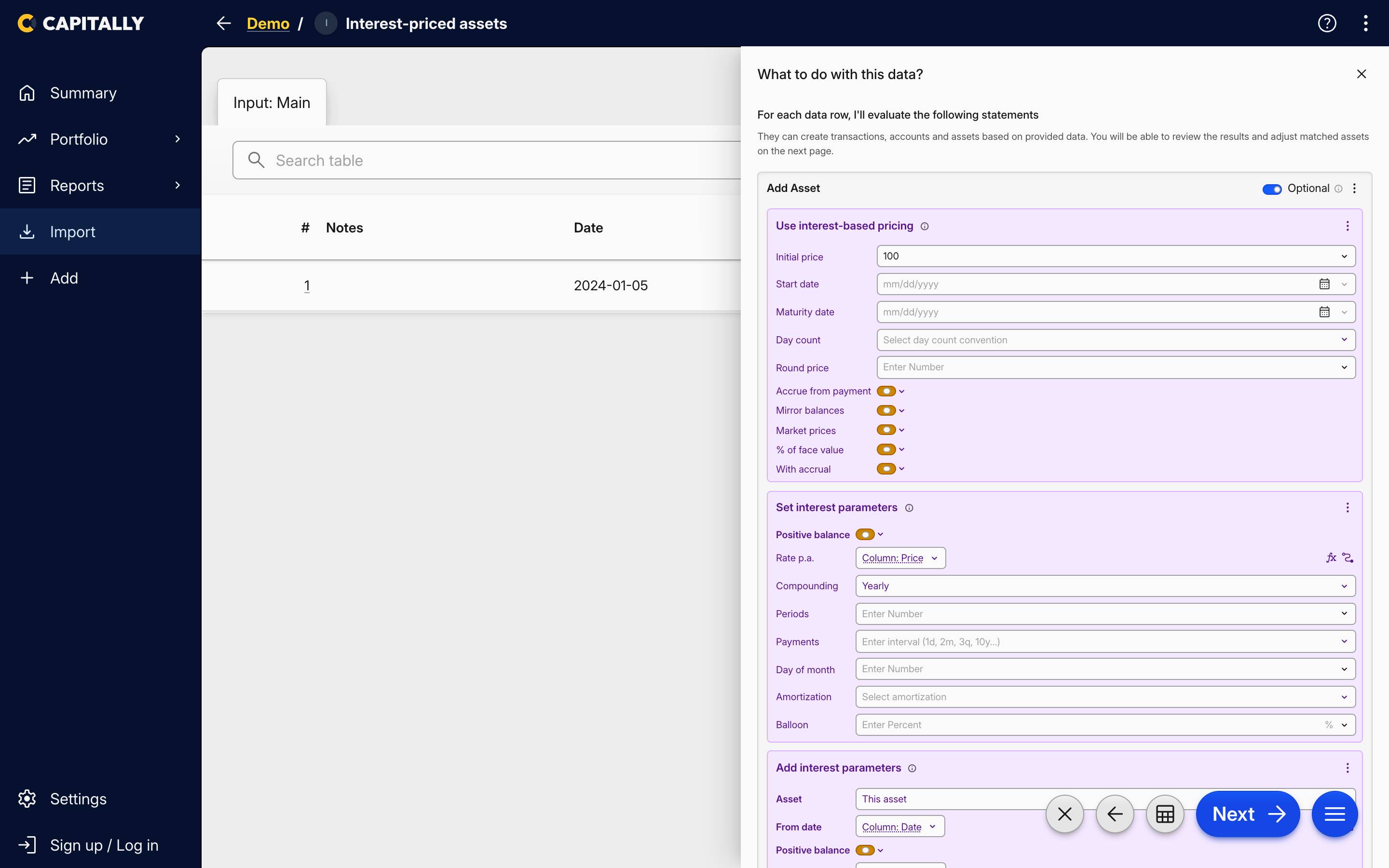 The three interest statements inside Add Asset, with Rate p.a. bound to a file column
To organize them better, consider creating custom Markets for all your bonds or deposits. This will allow you to compare them more easily.
Exploring Your Interest-based Assets
The Portfolio section allows you to compare the fixed income of all the assets in your portfolio. This includes Bonds, Stocks and Real Estate, enabling you to see which one is bringing the most effective yield.
If you are adding transactions or bond market prices with a future date, you can change the Date Period in the Portfolio to see the future value of your fixed-income portfolio. You can choose a particular date, or just type +6m to see six months into the future.
Clean price, % of par and yield to maturity
Three figures describe an interest-priced bond that the ordinary price column cannot. Clean price is the price without accrued interest — the number the market actually quotes. % of par is that clean price against face value, so a bond reads 98.5 whichever convention the asset itself stores. Yield to maturity is what you would earn holding it to maturity at today's price, as an effective annual rate.
Clean price and yield to maturity are available as table columns and as chart metrics; % of par shows beside the clean price in the figures above the table. Clean price is always denominated in the asset's own currency rather than the currency you are viewing the portfolio in, and yield to maturity is blank for a bond with no maturity to work towards — see portfolio metrics.