This report displays the output of your Tax Presets. It requires the presets to be set up, accounts to be assigned to them, and taxable transactions to occur.
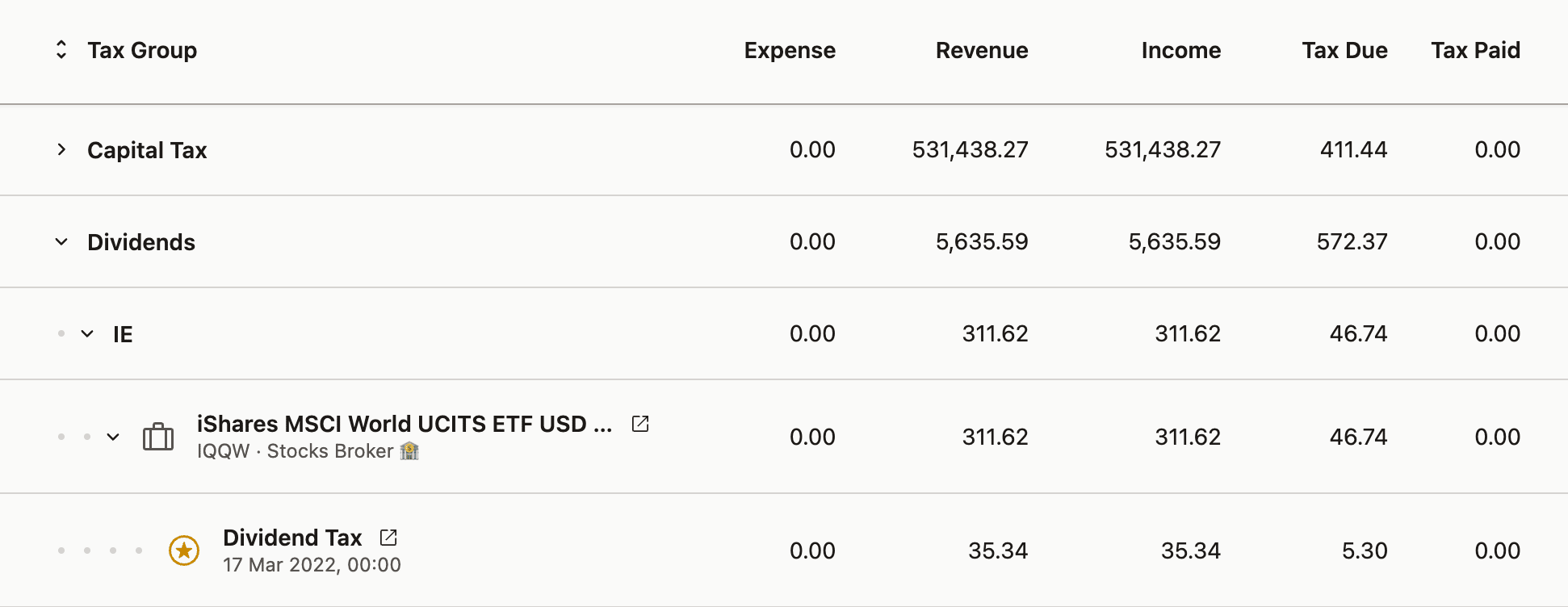
The metrics are grouped by the Tax Group specified in the preset for a particular transaction. Tax groups can be nested by using a / in their name. In the example below, dividends use the Dividends/IE group.
To better understand where specific numbers are coming from, you can expand the groups further to reveal the positions and individual transactions that were taxed.
Please note that taxes are applied to Position Units, which means that a single transaction can be divided into smaller fractions, particularly when a Sell transaction closes shares with varying cost bases. These fractional transactions will have a badge next to their name indicating the fraction they represent.
Choosing columns
The column editor sits above the table on the right, and an export contains exactly the columns you have on screen — so enable what your tax form needs before exporting, not after. The columns worth knowing about:
- Opening transaction — the matched purchase, including its acquisition date. This is the field US filers need for Schedule D.
- Opening FX and FX Rate — the exchange rate on the opening day and on the day of the taxable event, for checking which rate produced a figure.
- Tax to be Paid — Tax Due minus Tax Paid: what is still owed after tax already withheld at source.
- Notes — whatever
Add Notestatements in your preset wrote for that transaction.
Share quantities are not in this report; the Taxable Income Report carries a quantity column, in the table and in its export. For how the column editor works, see Configuring the table view.
Exports contain only the columns you can see
A CSV or Excel export — and a print-to-PDF — mirrors the columns currently shown. Enable the Opening transaction and exchange-rate columns first, or they will be missing from the file you hand to your accountant. See Exporting Data for the formats and for exporting a selection of rows only.
Reading the report
The report is annual by default and shows what each tax group accumulated over the year. Two figures surprise people: a negative Tax Due, which means a loss rather than an error, and a total that disagrees slightly with a broker report, which is nearly always an exchange-rate difference.
Negative Tax Due means a net loss for the period. The tax rate is applied to a negative result, so the figure represents a loss you can carry forward against future gains. No payment is owed.
Narrowing the period. The period filter limits the report to transactions closed inside a window — 1fq gives the last full quarter, which is what quarterly settlement regimes such as the Polish PIT-28 need.
Small differences against a broker report or a spreadsheet come from exchange rates: different providers use different sources and different times of day. A capital loss of 2,001 here against 2,146 elsewhere is a rate difference, not a calculation error, and differences of that size are normally immaterial to tax authorities. Enable the exchange-rate columns to see exactly which rates were used and compare them directly.
Which country a sale is grouped under is a property of your preset, not a product-wide rule. A tax-group expression can use Asset Country, Account Country or Market Country, and the built-in presets differ in what they pick — the Polish PIT-38 preset defaulted to Account Country and now defaults to Market Country. Check your own preset rather than assuming: Select Tax Group covers the expression, and Polish tax reporting walks through switching a preset between the three properties and what each of them answers.
A badge reading "25% of the position is taken into account" means 25% of that buy lot's shares were consumed by this sale — not 25% of the sale, and not 25% of your holding. The remaining 75% stays open and will be matched by future sells.