Interest-bearing assets like bonds, loans, and mortgages don't just sit there collecting dust in your portfolio. They work for you, generating income through interest payments and principal repayments over time. Instead of manually tracking every payment, Capitally can calculate these cash flows automatically based on the terms you specify.
You can use this feature not only to model assets you currently hold, but also to estimate how future rate changes might affect your portfolio or to compare different loan structures before making financial decisions.
When to use interest-based pricing
Use this pricing method when you hold assets that pay regular interest or when you owe money that accrues interest charges. This includes:
Government and corporate bonds that pay coupon payments on a schedule
Bank loans and mortgages where you're the borrower paying interest
Peer-to-peer loans where you're the lender receiving payments or the borrower
Certificate of deposits that compound interest over time
Credit lines and overdrafts that charge interest on negative balances
The key is that the asset's value changes predictably based on interest calculations rather than market fluctuations.
Mortgage example
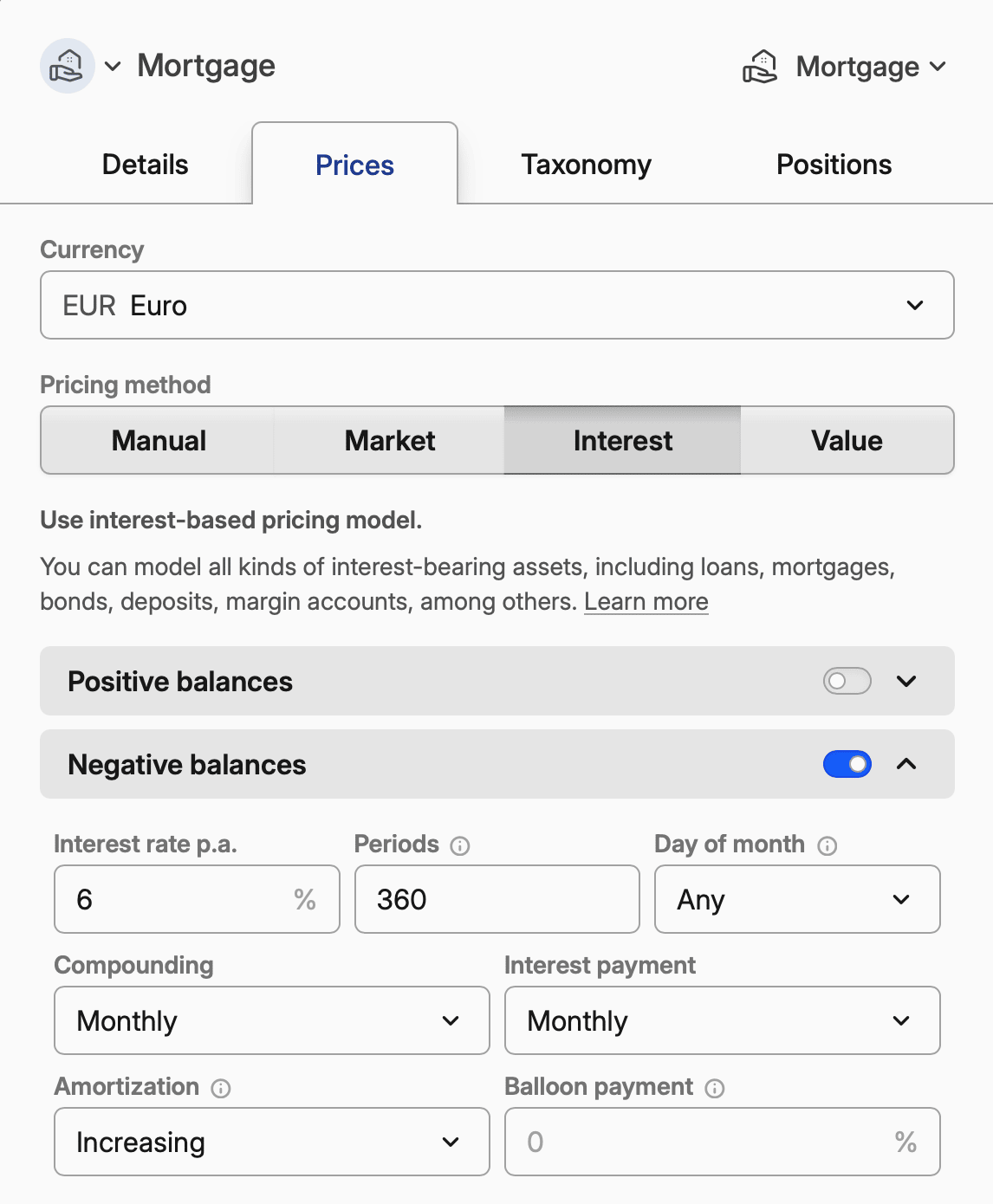
Here's how to configure a typical 30-year fixed-rate mortgage:
Setting | Value | Notes |
|---|---|---|
Same parameters for positive and negative balances | Enabled | One "Loan parameters" section covers the whole loan |
Interest rate p.a. | 6.0 | Your annual rate |
Compounding | Monthly | Standard for mortgages |
Interest payment | Monthly | When you make payments |
Periods | 360 | 30 years × 12 months, or give it a maturity date instead |
Amortization | Increasing | Standard mortgage amortization |
Initial price | 1 | Price per unit of currency |
For adjustable-rate mortgages, add rate overrides at each adjustment date. See Tracking Mortgage for complete setup instructions.
One set of terms, or one per balance side
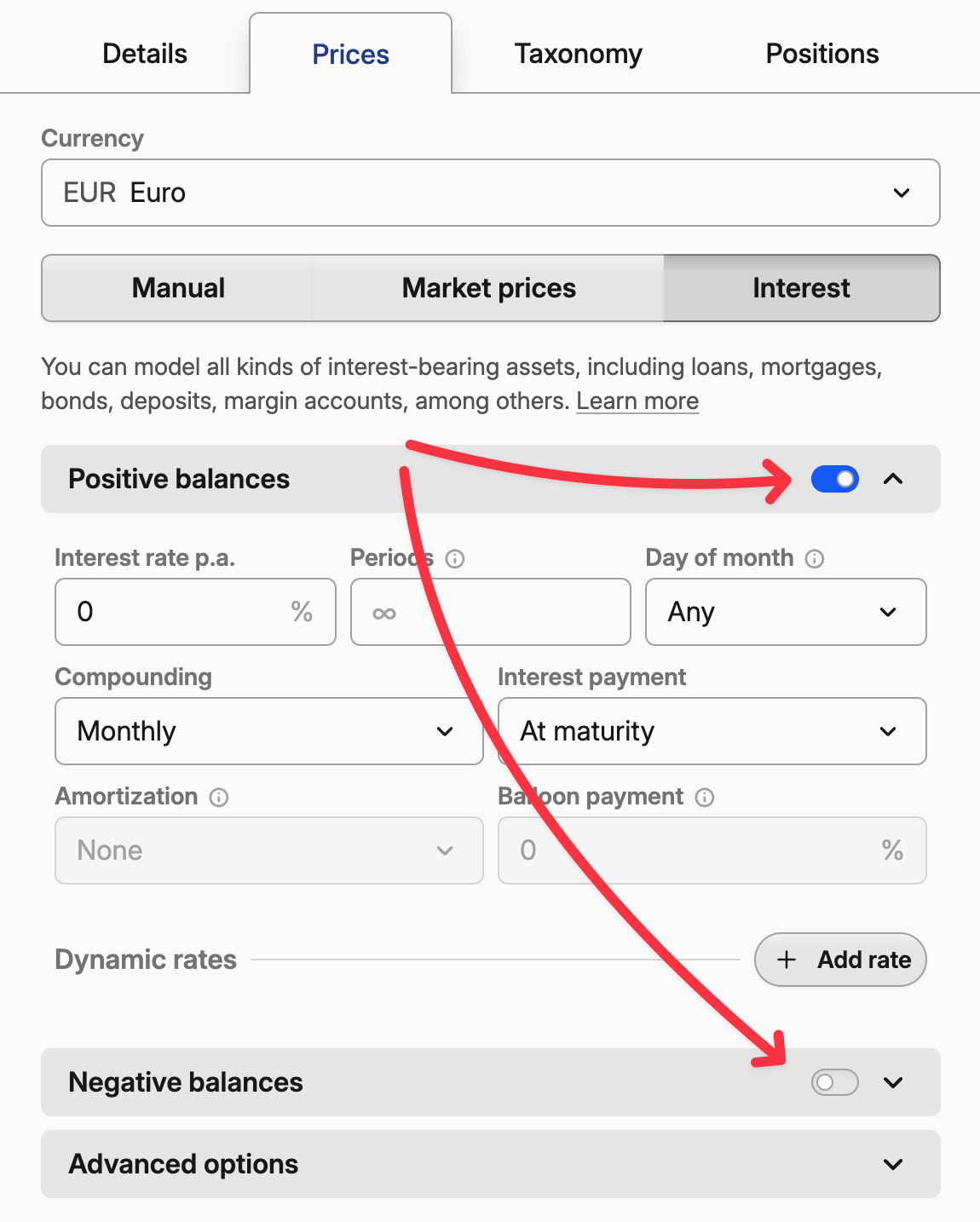
An interest-priced asset can hold separate terms for a positive balance and for a negative one. Same parameters for positive and negative balances, under Advanced options, mirrors one set across both, so it prices the balance whichever way it sits — money lent out and money owed are the same agreement seen from opposite ends. Bonds, loans and mortgages start with it on; deposits do not.
With it on, the editor shows one section named after the instrument: Bond parameters, Loan parameters for a loan or a mortgage, Interest parameters for anything else.
Turn it off when the two directions really are different. A current account might earn 0.5% on a credit balance and charge 15% on an overdraft, with its own compounding on each side; Positive balances and Negative balances are then both shown, each with a full set of terms.
Mirroring needs a single set of terms to share, so while both sides are configured the option is unavailable. Switch one side off first, and you decide which terms survive rather than having one discarded for you.
A loan you granted sits on a positive balance
A Loan or Mortgage puts its terms on the negative side, which is right for money you borrowed. Lend money out and the position is positive instead, so unmirrored terms price nothing: no interest accrues, no payments are generated, and there is no final payment date. If a loan you granted shows nothing, check if Same parameters for positive and negative balances is on.
Core interest settings
Interest rate p.a. is your annual percentage rate. For a 3.5% bond, enter 3.5. For a mortgage at 6.2%, enter 6.2.
Compounding determines how often interest gets added to your balance. Daily compounding means interest earns interest every day. Monthly compounding waits until month-end. Most bonds compound semi-annually, while savings accounts often compound daily.
Interest payment controls when you actually receive (or pay) the interest. "At maturity" means all interest pays out when the asset matures - common for zero-coupon bonds. Monthly payments are typical for mortgages and many corporate bonds.
Periods limits how long the interest calculations run. A 30-year mortgage has 360 monthly periods. A 10-year bond has 20 semi-annual periods. Leave it empty for a perpetual asset like a checking account — or set a Maturity date and let that end the schedule instead.
Day of month chooses a single day of month when interest is compounded and payouts are made. If left empty, dates are calculated based on the opening day.
Reinvesting the interest
Interest generated by interest-based pricing is paid out, not compounded into the position. Each payment is created as a cashflow transaction: it lands in the cash account when cash tracking is on, and shows up only under Income when it is off. The asset's Balance and Market Value do not absorb it, so a savings account modelled this way drifts further from its real balance the longer it runs.
To compound instead, edit the asset, open the Positions tab and set Automatic dividend handling to Reinvest fractional shares. Despite the name, this setting governs interest as well as dividends — that is the part nobody guesses. With it on, every interest payment is reinvested automatically, and Balance and Market Value follow the real account.
Leave it off when you import the bank's actual interest payments instead. Those imported transactions become the source of truth, as described under reconciling interest transactions.
Maturity, future payments and what the price means
Maturity date ends the schedule: the remaining principal is repaid and interest stops accruing on it. Setting it is optional — given a Start date and a Periods count, maturity is derived as start date + (periods × compounding interval), so a bond starting in October 2025 with 2 annual periods matures in October 2027. When a derived maturity comes out wrong, one of those inputs is wrong, most often Compounding, which sets how long a single period lasts.
On asset types other than bonds, deposits, loans and mortgages the same field reads End date. Which of the three you fill in decides how the coupon grid is anchored:
- Start date and Periods. The schedule runs forward from the start date.
- Maturity date and Periods, no start date. The start is derived by counting the periods back from maturity.
- Maturity date alone, with Accrue from coupon date on. The grid runs backwards from maturity, anchored on the last coupon falling on or before the date you opened the position. This is the setup for a bond bought on the secondary market whose issue date you do not know: give it the maturity date and the coupon interval and nothing else, and the first coupon you receive is a full one. Switch
Accrue from coupon dateoff and accrual starts at the purchase date with a pro-rated first coupon instead. A maturity date on its own, with no rate and no periods, is all a zero-coupon bond needs.
A maturity date that is not after the start date is rejected with Maturity date must be after the start date, and is ignored rather than freezing the bond. A position opened on or after the maturity date never accrues.
What the price represents
The price shown for an interest-priced asset is always the dirty price — what the position is worth including the interest accrued since the last payment. What supplies the clean part of it depends on whether Market prices is switched on.
With it off, the whole price comes from the schedule: principal plus accrued interest, resetting to the principal at every payout. That is the bond's worth held to maturity, not what it would fetch on the secondary market, and the price cannot be edited by hand.
With Market prices on, the clean price is a quote — from a bond symbol, from prices you enter, or both — and the schedule only supplies the accrual added on top. That is the resale value, and it is what a bond bought on the secondary market should be tracked against. See pricing a bond from a market quote.
Future coupons and the period selector
Future-dated transactions — scheduled coupons, or the final settlement you entered ahead of time — are not counted when the selected period is Max, YTD, 1Y or similar. Only the Hold period includes them. So when a bond shows a zero position or an unexpected result right after you enter future transactions, check the period selector first.
The same lever projects the schedule forward: type a future range such as 2025 2030 in the period selector, or +6m in the Portfolio's Date Period, and the chart includes the scheduled payments. See exploring your interest-based assets.
Pricing a bond from a market quote
The Market prices section values a bond from what the market says it is worth instead of from its own schedule. Switch the section on in the interest editor, point it at a bond symbol or enter prices yourself, and that quote becomes the bond's clean price; the schedule still supplies the accrued interest that turns it into the price you see.
Switching the section on is also what gives prices stored on the asset their meaning as clean quotes. Until it is on, the price editors stay read-only and any stored points sit inert.
Not offered for deposits, loans and mortgages
An agreement with a single counterparty is not quoted by anyone, so a Deposit, Loan or Mortgage has no Market prices section. An asset that already has it switched on keeps it.
Matching your source's quote convention
Two toggles say how to read the raw number, and the alert underneath them spells out the arithmetic they produce. Reading that line back is the quickest way to confirm you have the pair right.
Price is reported as a % of face value (% of the initial price on non-bonds) treats the quote as a percentage of par, scaling it by ÷ 100 × face value. Most bond quotes work this way. Leave it off if your source reports an absolute price. Check Face value against it: a bond switched to interest pricing starts at 100, but an unset face value counts as 1, and against that a 98.5 quote prices at 0.985.
Price is reported with accrual says the quote already includes accrued interest, so the clean price is derived by subtracting it. Exchange quotes are almost always clean, so leave this off unless your source states otherwise.
Accrue from coupon date (Accrue from last interest payment on non-bonds) accrues from the issue schedule's last coupon, which is what an exchange-traded bond needs — the price you paid included the interest accrued before it. With it off, accrual starts at the purchase date and the first coupon is pro-rated.
Where the clean price comes from
Source clean prices from market symbol takes a bond's name, ticker or ISIN. When the asset carries a valid ISIN, opening the picker searches by that ISIN before you type anything, so the matching quote is usually the first result. The search offers bond instruments only, whatever the asset's own type, because these quote conventions assume the 1–100 scale bonds are quoted on.
An absolute quote in another currency is converted into the asset's currency. A quote read as a percentage of par is not a currency amount at all, so it is never converted.
Manual clean prices — Manual dirty prices when the accrual toggle is on — takes points one at a time, or a pasted table of dates and prices. They are quotes in the same convention as the symbol, so a bond quoted as a percentage of par takes 98.5, not 985.
Which price applies on a given date
A symbol's most recent quote carries forward past the end of its series, so a weekend, a holiday or a lagging feed does not drop the bond back to its schedule price. It never carries backwards: before the first quoted date the schedule prices the bond.
Prices you enter override the symbol on their own dates. One entered later than the symbol's newest quote also stays in force after it, so a correction is not undone by the next print that arrives.
With no symbol behind them, your points are the whole series: they interpolate linearly between each other and carry forward past the last one.
Yield to maturity
Yield to maturity is the annual return you would earn buying the bond at today's price and holding it to maturity. Capitally solves it on the dirty price against the coupons and principal repayments still to come, and reports it as an effective annual rate — compounded yearly, whatever the coupon frequency, so it is comparable across bonds that pay at different intervals.
It is left blank when there is nothing to solve for: a perpetual schedule with neither a maturity date nor a finite Periods count, a bond that has already matured, an asset carrying terms on both balance sides, a price that is not positive, or a schedule the solver cannot converge on. The clean and dirty prices still show in every one of those cases.
Amortization and balloon payments
These features apply when you have a limited number of periods and regular interest payments. On a bond they are hidden — a bond is a bullet instrument, and its principal comes back in one piece at maturity — reappearing only on an asset that already carries an amortization schedule.
Amortization spreads principal repayment across the loan's life. "Even" amortization means equal principal payments each period. "Increasing" means larger principal payments over time.
Note on amortization vs. payments
If your combined interest and amortization payments remain constant throughout the loan term, which is common for mortgages, the amortization component is 'increasing.' In contrast, an 'even' amortization schedule—where the principal payment remains fixed—will cause your total payments to decrease over time.
Balloon payment specifies what percentage of principal gets paid in the final period. A 50% balloon payment means half the principal pays off at maturity, with the rest amortized over the loan's life.
Advanced options
Day count convention affects how interest accrues between payment dates. The choice depends on your specific bond:
- Actual/Actual counts the exact number of days in each period and year. US Treasury bonds use this method.
- Actual/Actual (Equal periods) also counts exact days but assumes all periods within a year are equal length. This works better for bonds with irregular payment schedules.
- 30E/360 treats every month as 30 days and every year as 360 days, regardless of the actual calendar. European bonds commonly use this.
- Actual/360 counts actual days but divides by 360 instead of 365/366.
When in doubt, check your bond's prospectus or offering document for the exact convention used.
Same parameters for positive and negative balances shares one set of terms across both directions, as described under one set of terms, or one per balance side.
Face value — Initial price on anything that is not a bond — is the price per bond, share or unit of currency the schedule is written against. A bond starts at 100; mortgages, loans and margin accounts should use 1.
Start date and Maturity date appear here whenever the terms are not mirrored. The start date overrides when interest calculations begin, which suits a mortgage with a single start date even though you can increase the borrowed capital by paying out tranches.
Round price per share is primarily used with bonds, which pay interest through coupons at a fixed rate. Your payment is then calculated by multiplying the rounded coupon rate by the number of units you hold.
Accrued interest paid at purchase
Accrued interest you pay the seller when buying a bond mid-period is not a fee, and putting it in the Fee field overstates your fee totals. It is not part of the bond's clean price either, and the clean price has to stay accurate for return calculations. Three ways to book it, depending on whether fee accuracy or cashflow tracking matters more:
- Separate
Othertransaction. Record the accrued interest as a negative value in anOthertransaction on the asset or on the cash account. Simplest, but it does not show up in cashflow tracking. - Fold it into the buy price. Raise the
Buyprice with a formula in thePricefield. For 100,000 face value bought at 95.05% plus 500 of accrued interest:(100000 * 0.9505 + 500) / 100000. On a bond quoted as a percentage of par you can switch the price field's unit to% of face valueand type the percentage directly instead — see adding transactions. - Fee correction. Keep the accrued interest as a fee on the
Buy, then add a correctiveOthertransaction on the cash account with a negative fee, which removes it from the fee total, and a negative value, which keeps it in returns. Neutral to returns, but expect temporary movement in portfolio metrics.
This is a separate question from Accrue from coupon date under pricing a bond from a market quote, which controls where interest starts accruing rather than how the purchase payment is booked.
Dynamic rates and overrides
Use dated overrides when an interest rate, payment schedule, amortization method or remaining period count changes during an asset's life. Each override takes effect on its date and carries forward until another override replaces it, so one asset can model an adjustable loan, a step-up bond, a promotional rate or a payment holiday.
How overrides work
Click "Add rate" to create an override that takes effect on a specific date. You can override any setting - interest rate, payment frequency, amortization schedule, or even the number of remaining periods.
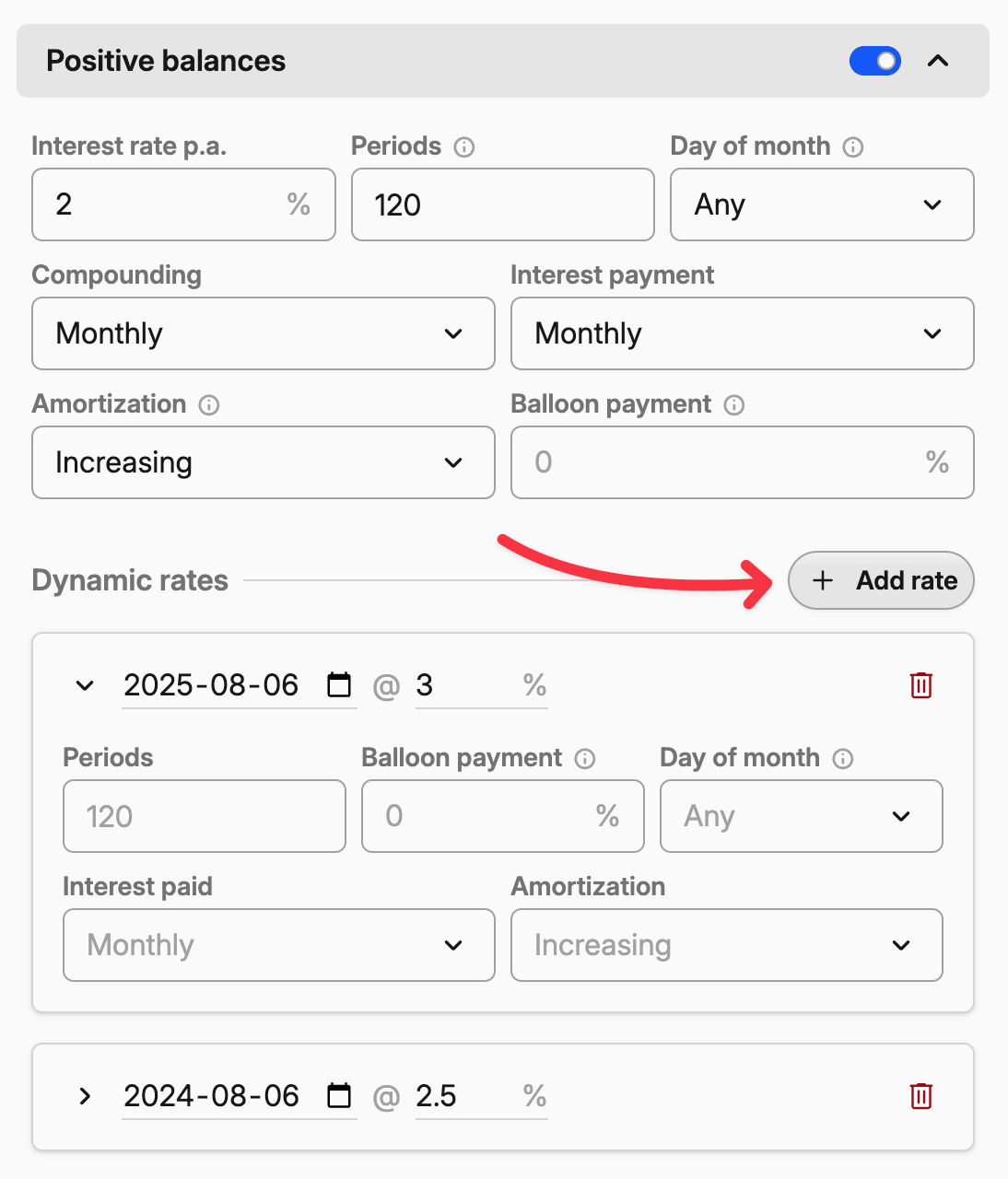
The system applies overrides in chronological order. If you have a base rate of 4% and add an override changing it to 6% starting January 1st, the rate jumps to 6% on that date and stays there until the next override (or until the asset matures).
Modeling rate changes
Adjustable mortgages: Your ARM starts at 3.5% and adjusts annually based on market rates. Add overrides for each adjustment date with your expected rates.
Step-up bonds: Corporate bonds sometimes start at 4% for the first five years, then jump to 6% for the remaining term. Add an override on the step-up date.
Promotional rates: Credit cards often offer 0% introductory rates that jump to 22% after 12 months. Model this with an override at the promotional expiration.
Rate changes can also come from an import. In advanced mode, Add interest parameters turns one row per rate change into one dated override; importing the same file again rewrites the change for that balance side and date instead of adding another one. See Setting up interest-based pricing.
Debt vacation periods
Sometimes you negotiate payment holidays or forbearance periods where you temporarily stop making principal payments but interest keeps accruing.
To model a debt vacation, add an override that changes the amortization to "None" during the forbearance period. Interest will continue compounding, but no principal gets paid down. Add another override when normal payments resume, adjusting the amount of periods if needed.
For example, if you have a 30-year mortgage and take a 6-month payment holiday in year 5, you'd add:
- Override at holiday start: Change amortization to "None"
- Override at holiday end: Change amortization back to "Even", extend periods by 6 months
Changing loan length
Refinancing, extra payments and loan modifications all change the term, and an override models them precisely. Periods always counts the total duration from the start date, so set it to the new total rather than to what is left to run.
If you refinance after 5 years of a 30-year mortgage and take a new 30-year term, the loan now runs 35 years from its original start date: add an override on the refinance date setting periods to 420, the 60 periods already paid plus 360 new ones. Conversely, if extra payments shorten the loan by five years, add an override on that date reducing periods from 360 to 300.
Rolling and back-to-back deposits
Bank time deposits that roll over at maturity, each time for a different term at a different rate, do not fit a fixed Periods count. Set the asset up as perpetual instead: create a Deposit or Bond asset with interest-based pricing, leave Periods empty, set Compounding to a year — monthly if the funds are generally reinvested — and set the interest payment frequency to match how the bank pays out. Add a rate override for each new deposit period as the rate changes.
At each maturity, edit the generated interest transaction and enter full amortization, which closes the position, then add a new Buy for the full amount received to open the next one. An advanced-mode preset can automate the whole cycle, including each dated rate change through Add interest parameters — see Setting up interest-based pricing.
Periods can be overridden per date as well, so a ladder whose durations are known in advance can keep a fixed Periods count with an override at each rollover instead. The perpetual setup is the simpler option when neither the rate nor the term is known ahead of time.
Either way, Capitally projects the schedule forward: future interest payments and cash flows appear as forecast transactions once you move the Date Period ahead. Read per-period results with care, because interest payouts get their own lots — reading returns on bonds and deposits explains what that does to lot returns.
Scenario planning
Interest prices aren't just for modeling reality - they're powerful tools for financial planning:
Rate shock analysis: Add overrides with higher interest rates to see how rising rates would affect your portfolio value.
Prepayment strategies: Model the effect of making extra principal payments by adding Sell transactions, or overrides that reduce the remaining periods.
Refinancing decisions: Compare your current loan against potential refinancing options by setting up different override scenarios.
Getting the details right
Interest calculations are precise but unforgiving. A small mistake in the dynamic rates or compounding frequency can throw off your entire portfolio value.
Start with the asset's official documentation. Bond prospectuses spell out exactly how interest gets calculated. Loan agreements specify payment schedules and rate adjustment mechanisms.
When possible, verify your setup against a known payment. If you know your mortgage payment should be $1,847.33, configure the interest settings and check that Capitally matches that amount.
Reconciling interest transactions
Once you import or add actual interest transactions, Capitally will automatically detect them and skip creating automatic payments for those dates. These imported transactions should serve as your source of truth for tax purposes.